PREPAIRE / GENETIQ
LIM INGESTOR
PLATFORM 3.0
Production architecture, operating Bible, and IRENA machine extraction standard

Native evidence first. Every derivative explainable.
CONTROLLED BASELINE | Implemented and testable; not approved for patient activation until site gates are signed. |
Version 3.0 | 16 August 2026 | Internal controlled copy
How to use this Bible
RELEASE BOUNDARY The repository is a production implementation baseline. It does not prove that a physical instrument, vendor interface, infrastructure environment, or laboratory process has passed local validation. Unresolved blockers remain release-stopping by design. |
Document owner | Prepaire laboratory data program |
|---|---|
Technical product | LIM Ingestor Platform 3.0 |
Registry | PREPAIRE-IRENA-ASSET-REGISTRY@3.0.0 |
Profiles | PREPAIRE-INSTRUMENT-PROFILE-REGISTRY@3.0.0 |
Evidence policy | PREPAIRE-VENDOR-EVIDENCE-POLICY@1.0.0 |
Source workbook | lab-assets-2026-08-15.xlsx / SHA-256 210b65046f7bccb1ec26379e824e825033f076df8f2d70aea31dfb6449296e06 |
Classification | Confidential - patient data is prohibited from this document |
Reading map
- Executive operating doctrine
- Architecture and trust boundaries
- Deployment and site activation
- LIM integration contract
- Software intake, build, and dockerization assurance
- Bayesian evidence and analytical validation
- Normalization, personalized baselines, and KG release
- Security, privacy, incident response, and recovery
- Operations and production readiness
- Verification report
- Vendor due diligence
- IRENA machine-by-machine extraction register
- Primary technical sources
Word Navigation Pane: every chapter and machine profile uses real heading styles. The separate machine manual PDF is optimized for bench-side lookup.
Executive operating doctrine
Platform 3.0 treats every laboratory output as evidence with identity, custody, method, software, quality, and lineage - not as a naked number. The instrument-native artifact is sealed first. Vendor interpretation is retained when useful, but it is never allowed to erase the signal, source context, or uncertainty that produced it.
DOCTOR STREETLIGHT PRINCIPLE Do not search only where a vendor report makes the light convenient. Preserve the strongest native evidence available, then compare transparent derivatives under controlled versions and measurable acceptance criteria. |
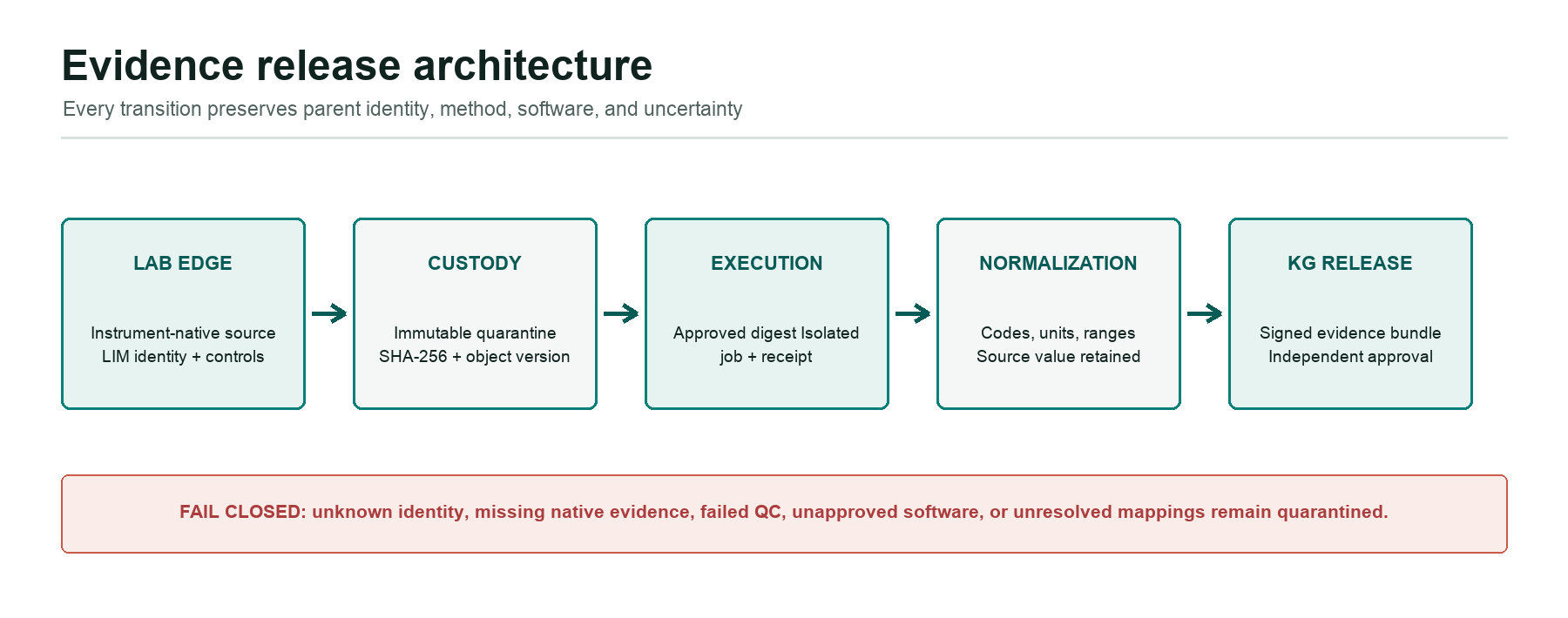
Figure 1. The governed path from physical evidence to a releasable knowledge-graph bundle.
Five non-negotiable decisions
- Native-first custody: the earliest supported machine evidence is immutable and addressable before conversion.
- No silent mappings: unknown code, unit, range, method, identity, or sample relationship causes quarantine.
- No software by reputation: every version and runtime mode must pass legal, security, reproducibility, and fixture gates.
- No monolithic model: pipeline stages are independently versioned services with declared inputs, outputs, references, and rollback paths.
- No causal overstatement: association, prediction, mechanistic support, intervention evidence, and causal claim remain distinct graph assertions.
Operating roles
Role | Accountability | Cannot self-approve |
|---|---|---|
Instrument owner | Identity, firmware, maintenance, export path | Patient release |
LIM owner | Event identity, accession/sample lineage, retries | Analytical validation |
Data engineering | Connector, custody, mappings, observability | Own code change |
Bioinformatics/science | Methods, references, fixtures, expected behavior | Security or QA gate |
Information security | Threat model, build and runtime controls | Clinical scope |
Quality assurance | Validation decision, deviations, release evidence | Unresolved mandatory gate |
Laboratory director | Clinical use authorization and final activation | Missing evidence |
First-shift operator guide
- Open Instruments and verify the physical asset label, serial, status, facility, and profile. Stop if any identity differs.
- Confirm the LIM work order, pseudonymous sample or accession reference, assay protocol, method version, operator, reagent lots, and expected output set.
- Acquire the run using the approved laboratory SOP. Do not rename, edit, move, compress, or re-export native files outside the registered capture rule.
- Allow the edge connector to copy the source bundle to quarantine. Confirm byte count, SHA-256, timestamps, expected files, and source identifiers.
- Review controls, machine flags, missing files, clock drift, and LIM reconciliation. A red gate means stop; do not override it in a spreadsheet.
- Submit the governed pipeline. Only exact approved software digests and reference-data checksums may execute.
- Review normalized observations beside their original value, unit, method, range, flags, and provenance.
- Escalate unknown codes, units, impossible values, unexpected duplicates, and identity conflicts through quarantine.
- A QA or laboratory-director role independently releases the signed evidence bundle to the KG.
- Retain the receipt. It explains what entered the graph, which software and references were used, and why each cross-axis value was produced.
Current IRENA posture
Measure | Current baseline | Release meaning |
|---|---|---|
Registered assets | 76 | Inventory scope, not activation count |
Unique profiles | 49 | One governed extraction contract per configuration |
Ready for local validation | 7 | Still requires installed-version and fixture evidence |
Blocked profiles | 1 | No patient connector may execute |
Registry blockers | 12 | Must be dispositioned before relevant activation |
Review findings | 5 | Resolve under controlled inventory change |
Architecture and trust boundaries
Controlled document: PREPAIRE-LIM-ARCHITECTURE@3.0.0 Status: Production implementation baseline System: LIM Ingestor Platform 3.0
Purpose
The platform separates evidence capture, conversion, quality control, normalization, inference, and knowledge-graph release. This prevents a vendor interpretation, spreadsheet correction, model output, or old population range from silently replacing the source measurement.
System context
Plane separation
1. Laboratory edge plane
- Runs within the laboratory network.
- Uses a vendor-supported read-only export, storage target, host interface, API, or managed export.
- Never writes to instrument databases or modifies vendor files.
- Records instrument serial, software/firmware, method checksum, run ID, operator, lots, timestamps, and local clock source.
- Hashes every source object and submits through checksum-bound multipart custody.
- Maintains no long-lived patient-data cache beyond approved retry retention.
2. Control plane
- Receives LIM work-order events.
- Enforces OIDC and role-based access.
- Stores durable run, artifact, pipeline, software, validation, release, and audit state in Postgres.
- Issues short-lived object-store URLs; credentials are never returned.
- Does not process multi-gigabyte evidence in a web request.
3. Evidence plane
- S3-compatible storage with versioning, KMS encryption, and compliance object lock.
- Native evidence is immutable after verification.
- Open and derived artifacts carry explicit many-to-many lineage to every upstream artifact in the same governed run.
- Each artifact receives a GA4GH DRS identifier only after independent size and SHA-256 verification.
4. Execution plane
- Kubernetes Jobs or GA4GH TES only.
- No Docker-in-Docker and no host Docker socket.
- OCI images are addressed by digest.
- Jobs run as non-root, read-only root filesystem, dropped capabilities, bounded resources, and explicit dependencies.
- Kubernetes jobs receive a projected, audience-bound service-account token; no reusable bearer credential is embedded in a job specification.
- The worker issues version-bound input URLs only for verified artifacts matching the stage's declared input classes.
- An execution remains RUNNING after compute exits until every declared output class is uploaded, independently re-hashed, and linked to the producing step. Missing outputs fail after the governed grace period.
- A stable producer output key makes registration resumable without allowing the same logical output to change identity.
- External vendor runtimes remain on supported vendor workstations and are represented by governed adapters.
5. Build plane
- Separate isolated GitLab project and restricted runner class.
- Source bundle is independently verified before a build request.
- Legal approval precedes BYOL or proprietary packaging.
- Build output includes OCI digest, CycloneDX SBOM, SLSA-compatible provenance, vulnerability scan, and signature.
- Successful build status is PENDING_VALIDATION; it does not imply approval.
6. Release plane
- Requires verified artifacts, completed required steps, approved software, resolved instrument blockers, a contract-valid KG bundle, and independent approval.
- The graph write adapter accepts released bundles only.
- Release is append-only and revocation creates a new record.
Software execution modes
Mode | Meaning | Default decision |
|---|---|---|
OCI_NATIVE | Software is designed and licensed for OCI/headless execution. | Build and validate. |
BYOL_CONTAINER | Proprietary software may be packaged under an explicit approved license. | Block until legal and vendor support are documented. |
EXTERNAL_VENDOR_RUNTIME | Vendor software stays on its workstation/server; a containerized adapter captures outputs. | Preferred for most instrument software. |
MANAGED_VENDOR_SERVICE | Vendor cloud/API is part of the validated system. | Pin service/model version and export contract. |
REPORT_ONLY_BLOCKED | Only a rendered/interpreted report is available or identity is unresolved. | Retain as context; prohibit sole patient/KG evidence. |
State machines
Run: DRAFT -> CAPTURING -> CAPTURED -> PROCESSING -> REVIEW_REQUIRED -> RELEASED
Any custody, identity, QC, software, or instrument failure may transition the run to QUARANTINED or REJECTED. CANCELLED is terminal for processing.
Artifact: PENDING_UPLOAD -> VERIFYING -> VERIFIED
Any mismatch transitions to QUARANTINED. Object-store metadata is never accepted as the sole hash proof; the verifier streams the stored version and recomputes SHA-256.
Execution output: REGISTERED -> MULTIPART UPLOAD -> VERIFYING -> VERIFIED -> STEP SUCCEEDED
A successful Kubernetes/TES status alone cannot complete a step. The expected output-class set and all output custody states must reconcile first.
Software: DRAFT -> PENDING_LICENSE -> PENDING_VALIDATION -> APPROVED or CONDITIONAL or REJECTED -> RETIRED
Only APPROVED builds may enter an active clinical pipeline definition. Conditional use is recorded but not auto-activated.
Data model
The Postgres schema binds:
- physical asset to exact serial and extraction profile
- source finding to resolution and approver
- physical instrument/assay scope to append-only quality and laboratory-director activation attestations from distinct identities
- software package to execution mode and legal/clinical scope
- source bundle to immutable object identity
- build to digest, SBOM, provenance, and gate attestations
- validation trial to fixture, operator, lot, site, result hash, and weight
- run to LIM correlation ID, sample reference, assay and instrument
- artifact to run, every upstream artifact, relationship, object version, hash, DRS ID, and class
- pipeline step to approved build, predecessor, declared input/output classes, execution finish time, and produced artifacts
- release record to the complete evidence manifest and KG bundle hash
- audit event to an append-only hash chain
Availability and scaling
- Stateless API deployment: minimum three replicas and a disruption budget.
- Worker replicas coordinate with Postgres row locking.
- Uploads go directly to object storage using short-lived part URLs.
- Large-object verification is asynchronous and horizontally scalable.
- Sequencing and proteomics compute are delegated to Kubernetes/TES with explicit resources.
- Database backups use point-in-time recovery; object evidence uses versioning, replication, retention, and inventory reconciliation.
Explicit non-goals
- The platform does not infer clinical truth from a software success status.
- It does not use a Bayesian vendor score as disease probability.
- It does not erase population ranges; it stores population, personal baseline, and homeostatic targets as separate versioned concepts.
- It does not containerize software merely because an installer exists.
- It does not make causal claims from cross-axis association alone.
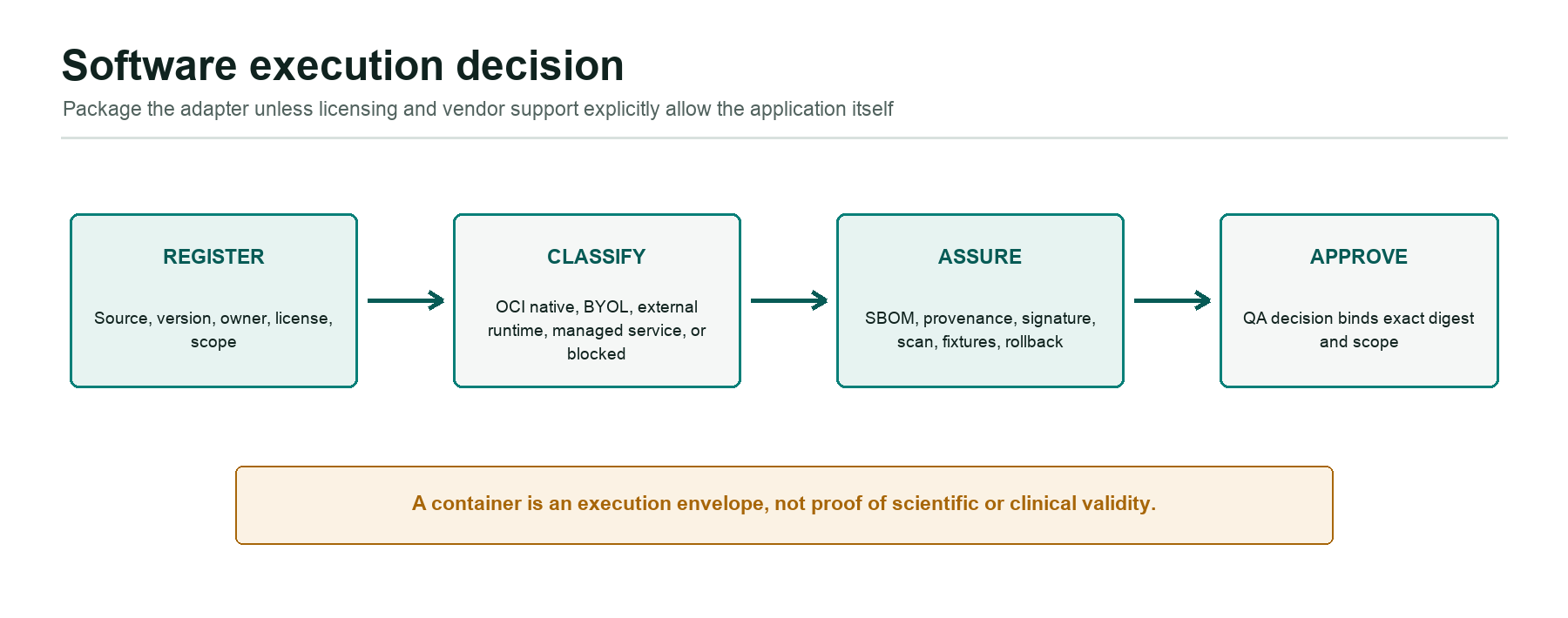
Figure 2. Runtime classification and software assurance precede deployment.
Deployment and site activation
Runbook: PREPAIRE-LIM-DEPLOYMENT@3.0.0 Baseline status: Infrastructure-ready source; site activation requires controlled evidence and signatures.
Deployment principle
The repository is deployable software, but a deployment is not an approved laboratory system. Promotion is allowed only by immutable image digest. Patient processing remains disabled until the exact site, instrument, assay, connector, software, terminology, infrastructure, and release workflow pass the production-readiness checklist.
Runtime publication modes
The hosting platform supplies PORT; the application must not assume a fixed external port. When mounted below a shared host path, set APP_BASE_PATH or NEXT_PUBLIC_BASE_PATH during the Next.js build so navigation, static assets, documentation downloads, and browser API calls stay within the assigned application path.
The runtime has two explicit modes:
- read_only: starts the registry and documentation console but rejects every privileged API with
PLATFORM_READ_ONLY. This is the required mode for an infrastructure bootstrap deployment.
- operational: enables the possibility of authenticated operations only after every required
database, OIDC, immutable-storage, KMS, callback, execution-identity, and execution-backend value is present. Ordinary clinical and site gates still apply.
Publishing the read-only console is not patient activation. Never set operational mode merely to clear a hosting health check.
Feynman Labs hosted console
Configure the Feynman application build with:
- APP_BASE_PATH=/apps/lim-ingestor-3-0
- PLATFORM_RUNTIME_MODE=read_only
Do not set a fixed PORT; Feynman injects it at runtime. pnpm build prepares the Next.js standalone artifact together with its static and public assets, and pnpm start launches that artifact through the validated production entrypoint. The expected health URL is /apps/lim-ingestor-3-0/api/v1/health.
Move this deployment to operational only after the required services below are provisioned and the complete site evidence package is approved.
Required platform services
Service | Required production control |
|---|---|
PostgreSQL | Managed high availability, TLS, encryption, point-in-time recovery, restore test, least-privilege roles |
Object storage | S3-compatible versioning, compliance object lock, KMS, inventory, replication, lifecycle monitoring |
Identity | OIDC issuer/JWKS, fixed audiences, role mapping, MFA for people, workload identity for services |
Execution | Restricted Kubernetes namespace or governed GA4GH TES engine; digest admission and no host socket |
Build plane | Separate GitLab project, isolated ephemeral runner, signed provenance, SBOM, scan, immutable registry |
Observability | Metrics, structured redacted logs, alerts, immutable audit export, SIEM integration |
Secrets | Managed secret store, rotation, access logging, no repository or environment-file custody |
Release image process
- Build the application and worker from the reviewed commit in an isolated GitLab runner.
- Generate SBOM and SLSA-compatible provenance.
- Scan dependencies, source, image, and secret patterns.
- Sign the image digest through the approved workload identity.
- Verify signature and provenance in admission control.
- Replace every REPLACE_WITH_RELEASE_DIGEST value in the site overlay with the exact approved digest.
- Apply migrations as a dedicated migration identity before rolling application pods.
- Seed only the controlled IRENA registry and findings; do not seed patient or example clinical records.
- Deploy API and worker, then verify health, OIDC, storage, database, and execution identity.
- Run non-patient fixtures and retain the signed deployment receipt.
The approved site then records two append-only activation attestations for each exact instrument/profile/assay/version scope: one by qa_officer and one by lab_director. They must be current and made by different identities. Either authority can revoke its own scope through a new attestation; history is never overwritten.
Protected GitLab variables
Configure these as protected project/group variables using approved immutable image@sha256:digest references:
- DOCKER_CLI_IMAGE
- DOCKER_DIND_IMAGE
- POSTGRES_CI_IMAGE
- TRIVY_IMAGE
- COSIGN_IMAGE
- KUBECTL_IMAGE
The pipeline fails closed when any required tool image is absent. It builds platform and worker targets separately, exports their pushed digests, scans both, signs both, and deploys both by digest. The fresh-database job applies the baseline migration, seeds only the instrument registry, verifies required triggers, and proves representative append-only mutations are rejected.
Configuration ownership
Public configuration may live in a site-specific Kustomize overlay. Credentials, client secrets, storage keys, and private material must come from the approved secrets manager.
Mandatory site values include:
- DATABASE_URL
- OIDC_ISSUER, OIDC_AUDIENCE, OIDC_JWKS_URL, and OIDC_ROLE_CLAIM
- S3_ENDPOINT, S3_REGION, S3_BUCKET, and KMS_KEY_ID
- object-store credentials delivered by workload identity where available
- PLATFORM_INTERNAL_URL
- EXECUTION_OIDC_ISSUER, EXECUTION_OIDC_AUDIENCE, EXECUTION_OIDC_JWKS_URL, and EXECUTION_OIDC_SUBJECT
- Kubernetes namespace and execution service account, or the governed TES endpoint
- GitLab build project and trigger identity
Operational startup fails when the required identity, database, storage, or execution callback configuration is absent. Read-only startup deliberately remains available for controlled publication and documentation while every privileged endpoint is closed.
Kubernetes workload identity
The worker creates an execution Job under lim-pipeline-executor. The Job receives a projected service-account token for the dedicated lim-ingestor-execution audience. The application accepts that token only when signature, issuer, audience, expiry, and exact subject all match the configured values.
The base manifests intentionally require a site overlay for issuer/JWKS, image digests, ingress, storage, database, and external egress. Restrict the base TCP 443 egress rule to the site's exact OIDC, storage, registry, audit, and approved vendor endpoints before activation.
For GA4GH TES, configure the engine's supported secret/workload-identity facility to supply a valid bearer token to the approved publisher. The platform deliberately does not embed a token in the TES task document.
Database activation
- Create separate migration, application, worker, and read-only support roles.
- Apply prisma migrate deploy to an empty qualification database.
- Confirm all append-only and immutable-identity triggers exist.
- Run mutation-negative tests against audit, approvals, validation evidence, releases, verified artifact identity, and approved build identity.
- Seed the registry and compare counts, source-workbook SHA-256, profiles, and findings.
- Perform backup and point-in-time restore before go-live approval.
Object custody activation
- Demonstrate bucket versioning and compliance object lock before the first upload.
- Upload a fixture with multipart part checksums.
- Complete the object and confirm a version ID is returned.
- Alter declared size and hash in negative fixtures; both must quarantine.
- Verify the worker independently streams the stored object version and recomputes SHA-256.
- Confirm a verified artifact cannot have identity or lineage modified in Postgres.
- Confirm download receipts are audited and URLs expire.
End-to-end qualification
Run at least these cases through LIM event, edge capture, execution, output custody, review, and disabled KG adapter:
- expected positive and negative reference materials
- malformed LIM event and duplicate event replay
- wrong instrument, missing serial, and inactive asset
- missing native file and corrupted multipart part
- unknown local code, unit conflict, and impossible converted value
- wrong image digest and revoked software build
- wrong workload token issuer, audience, subject, and expiry
- compute success with missing output
- changed identity under a repeated output key
- incomplete upstream lineage
- invalid KG JSON, schema failure, foreign DRS ID, and mismatched subject/run/instrument/build
- same-person submission and release attempt
- object-store, worker, database, and execution-backend recovery
Promotion and rollback
- Qualify one instrument, assay, software build, and pipeline definition scope at a time.
- Run a non-patient canary, then an approved prospective pilot with KG write disabled.
- Approval records bind exact digests and reference versions.
- Rollback uses the last approved image digest and database-compatible release plan.
- Runs crossing a deployment window are reconciled individually.
- A failed gate revokes the affected scope; expansion stops until quality disposition.
Site evidence package
Go-live evidence consists of the signed infrastructure qualification, migration result, object-lock proof, restore result, OIDC and workload-identity negative tests, penetration test, connector qualification, analytical validation, pipeline fixtures, terminology validation, operator competency, prospective reconciliation, incident exercise, and all required signatures.
Until that package is complete, the correct system state is NOT APPROVED FOR PATIENT ACTIVATION.
LIM integration contract
Contract: PREPAIRE-LIMS-INTEGRATION@3.0.0
Integration pattern
The LIM remains the authority for accession, sample, container, work order, assay protocol, and cancellation/quarantine state. The Ingestor is the authority for evidence custody, software identity, processing provenance, and KG release.
The connection is event-based. It does not scrape LIM tables and does not rely on a shared writable database.
Required LIM fields
Field | Rule |
|---|---|
eventId | UUID, globally unique, never reused |
eventType | RUN_READY, RUN_CANCELLED, or SAMPLE_QUARANTINED |
sourceSystem | Exact LIM product and environment identifier |
correlationId | Stable LIM work-order/run identifier |
instrumentAssetId | Must match the governed IRENA registry |
sampleRef | Pseudonymous sample identity; direct patient identifiers prohibited |
accessionRef | Pseudonymous accession identity when distinct |
assayProtocol | Controlled protocol identifier |
assayProtocolVersion | Exact released protocol version |
occurredAt | UTC or offset-aware ISO 8601 |
metadata | Contract-governed extension only |
Authentication
- OIDC client credentials for the lims_service identity.
- Audience exactly matches OIDC_AUDIENCE.
- JWKS signature, issuer, audience, algorithm, expiry, and role claims are verified.
- mTLS should be enforced at the ingress or service mesh in addition to JWT.
- Client secret or private key lives in the secrets manager, never in the LIM database, source repository, or spreadsheet.
Delivery
- LIM creates the work order.
- LIM sends RUN_READY to POST /api/v1/lims/events.
- eventId supplies idempotency. Repeating the same event returns the same receipt; changing the body with the same event ID is rejected.
- Ingestor verifies the instrument is active, identified, analytical, profiled, free of unresolved blockers, and dual-approved for the exact assay/version by distinct quality and laboratory-director identities.
- Ingestor returns runId.
- LIM stores runId against the work order.
- Instrument adapter associates the completed source run with runId.
- Status is read through the run endpoint or delivered through an approved webhook/outbox integration.
Instrument edge capture
The adapter uses PREPAIRE-EDGE-CAPTURE-MANIFEST@1.0.0. Each manifest binds the governed instrument, pseudonymous sample/accession, exact assay version, source time, and an ordered set of evidence files. Native evidence has no upstream artifact. Every derivative lists all upstream artifact paths; this produces explicit many-to-many lineage in Postgres.
Use the streaming command on a controlled edge host:
LIM_API_TOKEN=... pnpm ingest:capture --api https://lim-ingestor.example --manifest /controlled/path/capture.json
The edge host requirements are:
- read-only access to the completed vendor-supported run export
- synchronized clock and governed asset identity
- OIDC instrument_agent credential from a secrets manager or workload identity
- outbound TLS only to the Ingestor API and checksum-bound object-store URLs
- encrypted temporary retry storage with a documented time limit
- no source rename, edit, re-encoding, report scraping, or database write-back
The command streams SHA-256, uploads 64 MiB parts, persists a mode-0600 recovery journal, and resumes completed parts after an interruption. The token is never written to the journal. submitWhenVerified may be enabled only when an approved pipeline exactly matches the instrument profile, assay, and version.
Small diagnostic artifacts may use the bounded browser capture control. Large sequencing, mass-spectrometry, imaging, and directory-based evidence must use the edge command or a validated connector so browser memory is never the custody bottleneck.
Governed processing output
Approved pipeline images or their approved publisher wrapper receive a credential-free input manifest containing verified artifact identities and short-lived, version-bound download URLs. The runtime must verify each downloaded size and SHA-256 before processing.
Each produced file is registered at POST /api/v1/executions/{stepId}/artifacts using:
- a stable outputKey for idempotent recovery
- an artifact class declared by the approved pipeline stage
- filename, media type, format, size, and SHA-256
- every contributing upstream artifact ID, including at least one output from the immediate predecessor where applicable
Kubernetes uses a projected service-account token with a dedicated audience and exact approved subject. The token is mounted as a file and is never placed in the Job environment. A TES operator must supply equivalent workload identity through the engine's secrets mechanism; the platform does not place bearer tokens in the TES task document.
Compute success does not imply evidence success. The step remains incomplete until every expected output class has at least one verified artifact, no output is pending or quarantined, and lineage reconciles. The final run enters REVIEW_REQUIRED only after all ordered steps succeed.
Failure handling
- HTTP 401/403: stop retries until identity/role configuration is corrected.
- HTTP 409 instrument blocker: route to laboratory quality; do not change the instrument ID to bypass.
- HTTP 422: quarantine the event payload and correct mapping.
- HTTP 429/5xx: retry with exponential backoff and jitter for at least 24 hours.
- Unknown receipt: query by stable LIM correlation ID before creating another event.
- Cancellation/quarantine is a new event, never a deletion.
Result handoff
The Ingestor returns status and release receipts to the LIM. Patient-facing or clinician-facing interpretation remains a separate governed application boundary.
The LIM must store:
- Ingestor run ID
- artifact custody state
- pipeline version and state
- release ID or rejection/quarantine reason
- graph bundle hash
- approving role and timestamp
Mapping acceptance tests
- duplicate event
- amended event with reused ID
- unknown instrument
- inactive instrument
- missing serial
- wrong assay version
- sample cancellation before capture
- quarantine during processing
- clock-offset boundary
- pseudonym format failure
- connectivity loss and replay
- out-of-order events
No live patient flow is enabled until every fixture passes and the joint LIM/Ingestor reconciliation report is signed.
Software intake, build, and dockerization assurance
Policy: PREPAIRE-SOFTWARE-ASSURANCE@3.0.0
Governing rule
Containerization is a deployment mechanism, not a validation claim. The exact program, model, reference files, parameters, license, operating environment, and intended use remain governed whether software runs in a container, on a vendor workstation, or in a managed cloud.
Decision process
- Identify the exact vendor product, module, version, patch, firmware, runtime, assay, reference, method, and configuration.
- Classify the execution mode.
- Confirm rights to copy, package, automate, benchmark, export, and run the software in the intended location.
- Capture native evidence before software interpretation.
- Register source as a checksum-verified restricted bundle when an OCI build is allowed.
- Build in isolation with no patient data, no production credentials, no host socket, and no unrestricted egress.
- Produce attestations: digest, SBOM, provenance, vulnerability results, signature, and base-image identity.
- Validate on approved positive, negative, boundary, malformed, and expected-failure fixtures.
- Decide using mandatory gates and the versioned reliability policy.
- Bind the approved build to one instrument profile, assay version, and pipeline definition.
- Monitor drift and revoke on unapproved change.
What is containerized
- Open-source converters and QC tools: generally OCI_NATIVE.
- Vendor command-line software with explicit container/headless rights: BYOL_CONTAINER.
- Adapters, parsers, message receivers, and export watchers: generally OCI_NATIVE, even when vendor software stays external.
- Instrument control GUIs, dongle-bound software, workstation-locked software, and unsupported database access: never moved without written vendor and legal approval.
- Vendor cloud services: represented as MANAGED_VENDOR_SERVICE; the adapter is containerized, not the service.
Source intake
Use the streaming uploader:
LIM_API_TOKEN="$TOKEN" pnpm software:upload \ --api https://lim-ingestor.example.com \ --package approved-package-key \ --file vendor-or-adapter-source.tar.gz
The client:
- streams SHA-256 without loading the file into memory
- uses 64 MiB checksum-bound parts
- records upload ID, part ETags, and checksums in a mode-0600 resume journal
- completes to object-locked versioned storage
- waits for independent server-side re-hashing before build eligibility
Preserve the resume journal as controlled build evidence. It contains identifiers and hashes, not the API token.
Build-plane security
- Dedicated runner identity and isolated network segment
- Ephemeral runner per build
- No production database, object-store, LIM, or KG credentials
- Source download through read-only workload identity scoped to one object version
- Egress deny by default
- No unreviewed build-recipe network access
- Approved base images by digest
- Rootless BuildKit or equivalent
- Malware and archive-bomb checks before extraction
- Path traversal and symlink escape prevention
- SBOM and provenance retained at least as long as the clinical evidence
- Signature verified again at deployment and execution
- Approved output publisher/wrapper that verifies input hashes, uses stable output keys, streams multipart uploads, and cites complete upstream lineage
- Workload identity through a projected token or approved TES secret provider; reusable API tokens in images, task documents, or environment variables are prohibited
Mandatory gates
- native evidence preserved
- open derivative verified
- identity trace complete
- exact version pinned
- license approved
- signature verified
- SBOM verified
- security review passed
- expected-result fixtures passed
- clinical scope approved
- rollback proven
A failed or absent gate produces BLOCKED irrespective of the statistical score.
Change control
Any change to these values requires a new build and prospective validation:
- vendor patch
- model weights or model identifier
- reference assembly/database
- sample sheet or manifest
- algorithm parameter
- base image
- OS/runtime library
- instrument firmware that affects output
- assay method
- pipeline order
Emergency security patches follow the same identity and evidence chain; urgency changes review timing, not evidence requirements.
Runtime conformance contract
An approved execution image must consume PREPAIRE_INPUT_MANIFEST, verify every version-bound input against the declared size and SHA-256, and publish outputs through PREPAIRE_OUTPUT_ENDPOINT. On Kubernetes, it reads the bearer token from PREPAIRE_TOKEN_FILE. It must not print URLs, tokens, pseudonymous identifiers, or result payloads to logs.
The publisher assigns one stable outputKey per logical output. Retrying the same key with the same identity resumes or returns the existing record; changing the class, size, hash, format, or lineage under that key is rejected. The container exits successfully only after each multipart upload has reached VERIFYING; platform completion still waits for the independent server-side hash pass.
Bayesian evidence and analytical validation
Active policy: PREPAIRE-VENDOR-EVIDENCE-POLICY@1.0.0
Purpose
The policy estimates the reliability of an exact software-output path under validated conditions. It does not estimate disease probability, patient risk, biological truth, or causal certainty.
Model
The platform uses a Beta-Binomial posterior:
alpha_post = alpha_0 + sum of weighted passing evidence
beta_post = beta_0 + sum of weighted failing evidence multiplied by failure severity
The neutral prior is Beta(1,1). A severe failure uses the configured multiplier. The decision uses the lower 95% credible bound, not the posterior mean.
Evidence weights:
Evidence | Weight |
|---|---|
Single run | 1.00 |
Cross-operator | 1.25 |
Cross-lot | 1.50 |
Cross-site | 2.00 |
External proficiency | 3.00 |
The weights and thresholds are policy choices approved by PREPAIRE quality and laboratory leadership. They are not universal biological constants.
Decision order
- Evaluate all mandatory gates. Any false or absent gate produces BLOCKED.
- Calculate effective evidence and posterior.
- Below the conditional minimum produces INSUFFICIENT_EVIDENCE.
- Approval requires the approval minimum and lower bound.
- Conditional use requires the conditional minimum and lower bound.
- Otherwise the decision is REJECTED.
The baseline thresholds are deliberately conservative and must be reviewed against assay-specific risk.
Validation design
Each campaign binds:
- exact software build
- exact instrument profile
- protocol version
- fixture-manifest hash
- operator, reagent lot, site, and result hash
- expected pass/failure
- severity
Required fixture classes:
- blank and negative
- positive reference
- boundary around reportable range
- dilution/linearity series
- interference
- carryover
- duplicate and repeat
- invalid barcode or identity mismatch
- malformed/truncated source file
- unknown code/unit/flag
- changed software/reference/method
- amendment and cancellation
- network interruption/replay
- rollback
Analytical validation
Software concordance complements but never replaces laboratory method validation. Assay owners define precision, accuracy, sensitivity, specificity, reportable range, detection limits, reference interval verification, interference, carryover, and measurement uncertainty under the applicable regulatory and accreditation framework.
Drift monitoring
- exact version heartbeat on every run
- reference/database checksum on every run
- control-material trend
- conversion and parsing reconciliation
- unit and local-code mapping drift
- instrument firmware/configuration drift
- vendor managed-service release events
- model performance stratified by relevant population and pre-analytical conditions
Drift opens a new finding and blocks new releases when it affects the validated scope.
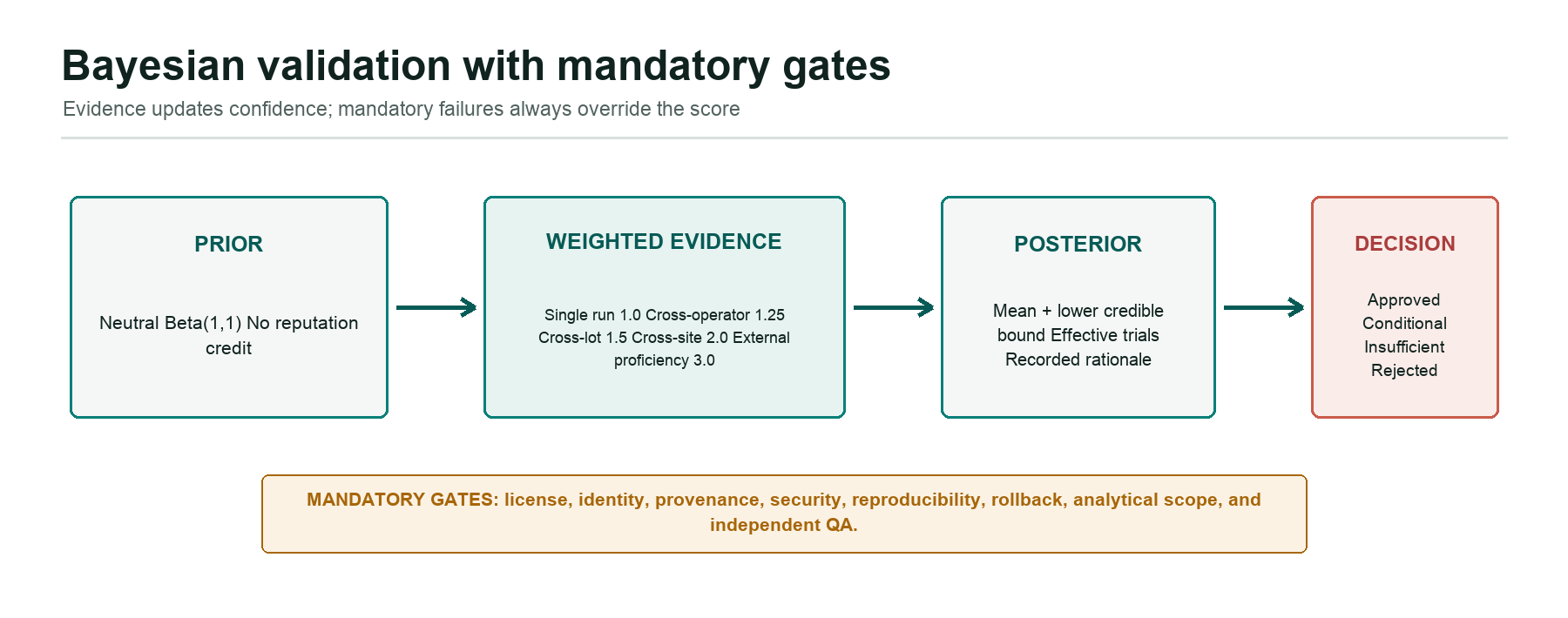
Figure 3. Evidence changes confidence; a failed mandatory gate remains decisive.
Normalization, personalized baselines, and KG release
Contract: PREPAIRE-DATA-GOVERNANCE@3.0.0
Doctor Streetlight principle
A convenient vendor report illuminates only what its software chose to expose. The Ingestor preserves the native evidence and the conditions that produced it before it uses the illuminated interpretation. The report is evidence about an interpretation; it is not a replacement for the source signal.
Evidence classes
Class | Meaning |
|---|---|
NATIVE_RAW | Earliest supported machine evidence, preserved before conversion |
OPEN_DERIVATIVE | Interoperable representation reconciled to native evidence |
QC | Controls, calibration, flags, reconciliation, and quality evidence |
NORMALIZED | Semantically mapped observations without source-value destruction |
DERIVED | Model, statistical, or cross-axis output linked to every input |
REPORT | Human-readable vendor or platform rendering |
MANIFEST | Identity, checksum, software, method, reference, and lineage |
AUDIT | Append-only action and decision evidence |
Source preservation
- Native files remain immutable and independently retrievable.
- Original numeric precision, unit text, local code, reference interval, flags, comments, and amendment state are retained.
- Corrections create a new normalized version and provenance link.
- Unknown codes and units quarantine; they do not map to the nearest guess.
- Duplicates are resolved through stable message/run identity, never by dropping equal values.
Semantic normalization
Clinical observations use:
- LOINC for observation identity where an appropriate code exists
- UCUM for machine-interpretable units
- SNOMED CT or an approved terminology for specimen, method, finding, and interpretation where licensed and applicable
- FHIR R4 DiagnosticReport and Observation projections for clinical interoperability
- versioned local-code maps with approver, effective date, method, specimen, and unit constraints
Genomic and omic artifacts use domain-native standards as applicable:
- FASTQ, BAM/CRAM, VCF/gVCF and GA4GH identifiers
- mzML for open mass-spectrometry spectra
- IDAT as native array intensity evidence
- POD5 as Oxford Nanopore raw signal evidence
- DRS identifiers for immutable artifact retrieval
Reference ranges
Population reference, personal baseline, and homeostatic target are separate facts:
Population reference interval
- source laboratory or publication
- analytical method and platform
- population inclusion/exclusion
- age, sex and other applicability dimensions
- unit and specimen
- version and effective dates
Personal baseline
- defined minimum number and timing of accepted observations
- stable-health inclusion rules
- pre-analytical and analytical comparability
- robust estimator and uncertainty
- explicit reset/change-point policy
Homeostatic target
- model and intended use
- input features and missingness
- confidence/uncertainty
- validation population and limitations
- clinical or research status
The normalized observation never overwrites the source laboratory interval. Each interval is displayed and reasoned over independently.
Cross-axis evidence
A cross-axis signal references at least two accepted input observations and records:
- every input observation ID
- model name, version, OCI digest, and validation decision
- intended use: clinical support, research, or informational
- confidence and uncertainty
- explanation suitable for a non-specialist
- causal status
Causal status defaults to association_only. Mechanistically supported and clinically validated labels require explicit governed evidence. Model output cannot upgrade its own causal status.
Lay explanation receipt
Every displayed convolutional or cross-axis value should expose:
- what was measured
- what the machine supplied
- what was converted or normalized
- which other markers contributed
- direction and approximate contribution of each input
- population interval, personal baseline, and homeostatic target
- model identity and purpose
- confidence and missing data
- why the signal changed from the prior accepted observation
- what the result cannot establish
The receipt is generated from provenance and structured model explanation, not from an unconstrained language-model narrative.
KG release bundle
The contract at contracts/kg-evidence-bundle.schema.json requires:
- pseudonymous subject reference
- run and observation identity
- coded concepts and terminology versions
- quantity or coded value
- source artifact DRS ID
- quality state
- separate versioned intervals
- cross-axis input links
- model digest and validation decision
- causal status
- complete instrument, software, and terminology provenance
Only a verified bundle passing this contract and the independent release endpoint may reach the graph write adapter.
Release withdrawal is also append-only. An authorized quality or laboratory-director identity submits a checksum-bound revocation evidence record against the exact approved release. The transaction creates a distinct REVOKED release record, links it to the approval it supersedes, moves the run to REJECTED, and writes the audit event atomically. The graph adapter must consume revocation receipts and prevent the superseded bundle from being used for new decisions while preserving its historical provenance.
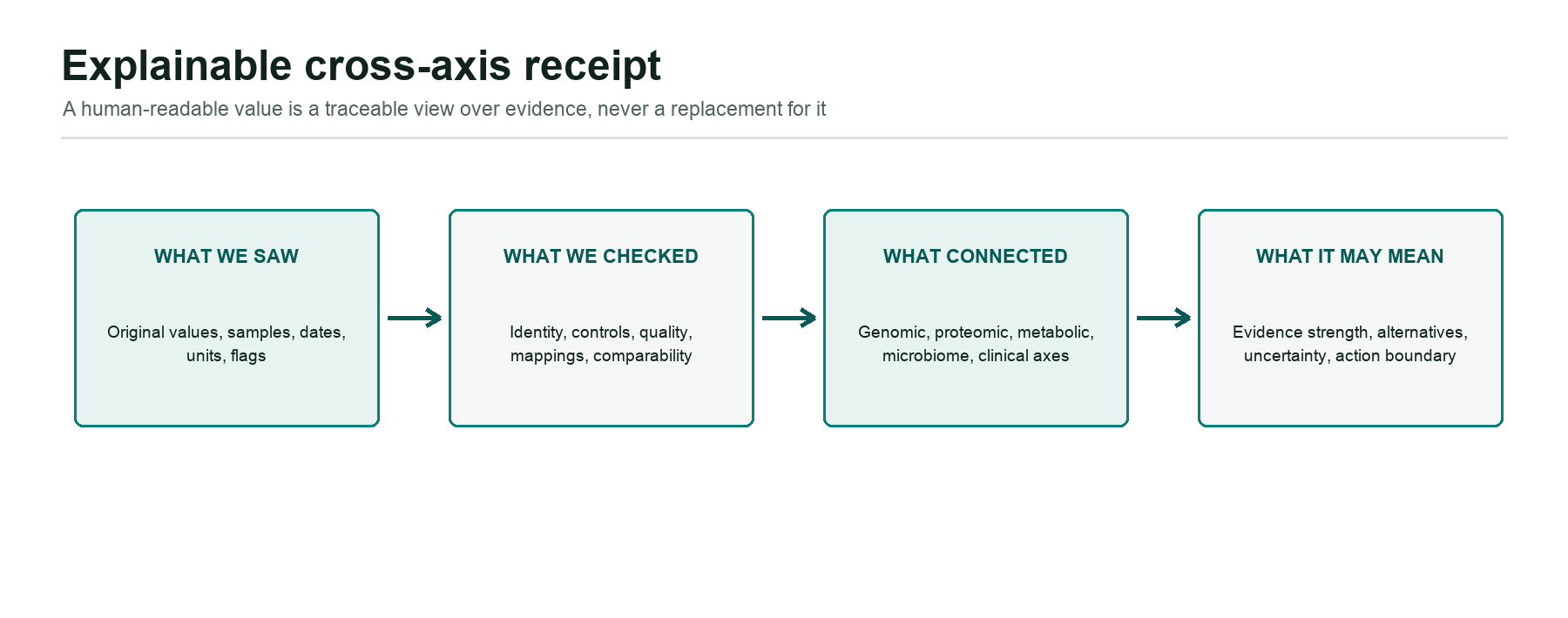
Figure 4. The lay explanation receipt links a conclusion to every supporting layer.
Security and privacy
Policy: PREPAIRE-LIM-SECURITY@3.0.0
Data classification
- Native and derived patient evidence: restricted health data
- Source bundles and proprietary vendor software: restricted intellectual property
- Asset serials and facility mapping: confidential operational data
- Validation fixtures: confidential unless explicitly public
- Aggregate readiness metrics: internal
- Secrets and private keys: secrets-manager only
Direct patient identifiers are prohibited in object keys, logs, run IDs, sample references, GitLab variables, and software source bundles.
Identity and authorization
- OIDC JWT verification with fixed issuer, audience, JWKS, algorithms, and expiry
- mTLS at ingress/service mesh for service identities
- roles: instrument_operator, instrument_agent, lab_scientist, qa_officer, lab_director, platform_admin, security_auditor, legal_approver, and lims_service
- least privilege and separation of duties
- pipeline creator cannot approve the same definition
- legal approval is required before proprietary OCI build
- QA/laboratory leadership controls clinical release
- Kubernetes execution identity uses a projected audience-bound token, exact issuer/JWKS, and exact service-account subject
- the run submitter cannot approve the same KG release
Primary threats and controls
Threat | Control |
|---|---|
Vendor output silently loses source detail | Native evidence sealed first; open derivative reconciliation |
File changed after upload declaration | Part checksums plus independent stored-object SHA-256 |
Wrong sample or instrument | LIM identity, serial/profile gate, barcode lineage, reconciliation |
Duplicate/replayed LIM event | event UUID and persisted idempotency hash |
Mutable container tag | OCI digest required by execution backend |
Compromised image | SBOM, scan, provenance, signature, admission verification |
Container escape | non-root, read-only root, seccomp, dropped capabilities, no host socket |
Stolen execution credential | projected short-lived token file, dedicated audience/subject, no token in image/task environment/log |
Compute exits without durable evidence | expected output classes, stable output key, independent re-hash, bounded grace period |
Build-source exfiltration | isolated build plane, no patient data, deny egress, scoped workload identity |
Proprietary-license violation | legal approval gate and execution-mode classification |
Model/reference drift | checksum/version recorded on every run; change triggers revalidation |
Unauthorized evidence download | OIDC role check, five-minute version-bound URL, audit event |
Audit tampering | append-only database trigger and event hash chain |
Unit/code corruption | strict map versioning; unknowns quarantine |
False causal claim | contract-controlled causal status and independent evidence |
PHI in logs | pseudonymous references, structured logging allowlist, redaction tests |
Cryptography
- TLS 1.2 minimum; TLS 1.3 preferred
- KMS envelope encryption for object storage
- database encryption at rest through managed service
- SHA-256 content identity
- OCI signatures verified through Sigstore Cosign or approved equivalent
- key rotation and revocation tested
- no application-managed master encryption key
Network
- namespace default deny
- ingress only through approved gateway
- explicit egress to DNS, OIDC, Postgres, object store, Kubernetes API/TES, audit sink, and GitLab build API
- execution jobs deny egress unless the approved package requires a documented destination
- vendor workstation adapter uses outbound-only connection where possible
- no direct instrument exposure to the internet
Logging
Logs include request ID, actor subject, role, action, resource identity, status, and error code. Logs exclude patient identifiers, access tokens, object URLs, source contents, genetic variants, and raw values unless a dedicated restricted audit control requires them.
Vulnerability management
- dependency lockfile and supply-chain policy
- critical vulnerability build failure
- SBOM retention
- base image and dependency refresh cadence
- emergency revocation path
- penetration testing before patient activation and after material boundary changes
Privacy
- data minimization at every interface
- purpose limitation represented in consent/clinical scope outside this repository
- retention policy by evidence class and jurisdiction
- deletion is implemented through legally approved crypto-erasure/retention workflows; object lock cannot be bypassed
- cross-border transfer and vendor cloud processing require documented legal assessment
- training or model improvement use requires a separate approved purpose and de-identification assessment
Security release checklist
- threat model signed
- ingress and egress tested
- OIDC negative tests passed
- workload identity wrong-issuer, wrong-audience, wrong-subject, malformed, and expired-token tests passed
- secrets-manager integration verified
- object lock and versioning demonstrated
- restore performed
- image signature admission enforced
- audit export reconciled
- PHI log scan clean
- incident exercise completed
Operations runbook
Runbook: PREPAIRE-LIM-OPERATIONS@3.0.0
Daily start-of-service
- Confirm API, database, object store, OIDC, worker, execution backend, and audit sink health.
- Confirm no overdue backup, replication, object inventory, or certificate alert.
- Review instrument identity/configuration drift.
- Review quarantined artifacts, failed steps, and open blocker findings.
- Confirm validation or software approvals have not expired or been revoked.
- Reconcile LIM work orders against Ingestor runs.
- Record shift handover.
Standard run
- LIM issues a versioned work order.
- Ingestor returns run ID only after current quality and laboratory-director attestations match the exact instrument profile and assay version.
- Operator confirms sample/container and instrument run identity.
- Adapter waits for vendor-supported run completion.
- Adapter snapshots the complete native package and records software/method/lot context.
- Adapter computes SHA-256 and uploads through multipart custody.
- Worker independently verifies the stored object.
- Operator confirms native evidence count and source reconciliation.
- Approved pipeline is submitted.
- Worker resolves only verified inputs matching the declared classes and starts the digest-pinned stage under workload identity.
- The approved publisher registers stable output keys, streams outputs, and declares complete parent lineage.
- Worker independently re-hashes each output; compute completion alone does not complete the step.
- QC and reconciliation determine accepted, qualified, or rejected observations.
- The final step produces a verified KG evidence bundle.
- The platform re-reads and validates the bundle against the run, instrument, builds, pipeline, and DRS evidence.
- An independent reviewer assesses release gates.
- Release receipt and graph-bundle hash return to LIM.
Emergency release revocation
- Open a controlled quality incident and preserve the evidence URI and SHA-256.
- A qa_officer or lab_director calls POST /api/v1/releases/{releaseId}/revoke with a substantive reason and checksum-bound evidence.
- Confirm the returned revocation receipt identifies the superseded release and the run state is REJECTED.
- Confirm the graph adapter has consumed the revocation receipt and blocked the bundle from new decision support.
- Reconcile LIM, downstream caches, clinical communications, and affected subjects under the incident procedure.
Manual edge command
- Copy config/examples/edge-capture-manifest.example.json into the controlled run workspace.
- Replace every placeholder with the LIM-issued pseudonymous references, governed asset ID, released protocol/version, and exact source paths.
- List native files first. For each derivative, set sourceArtifactPaths to every earlier file that contributed to it.
- Validate the manifest against contracts/edge-capture-manifest.schema.json under the approved site procedure.
- Obtain a short-lived OIDC token with the instrument_agent role through the approved secrets workflow.
- Run LIM_API_TOKEN=... pnpm ingest:capture --api https://lim-ingestor.example --manifest /controlled/path/capture.json.
- Preserve the generated mode-0600 state journal. Rerun the same command after an interruption; do not delete or edit the journal.
- Confirm the receipt lists every artifact ID and SHA-256. The initial state is VERIFYING.
- Wait for independent full-object verification. A mismatch quarantines the run and blocks processing.
- Reconcile the run, artifact count, source paths, instrument identity, and LIM work order before submission.
Quarantine
Quarantine immediately for:
- sample, barcode, accession, run, or instrument identity mismatch
- missing native expected file
- size or hash mismatch
- unknown unit/code/flag
- unapproved software/reference/method change
- invalid QC/calibration
- incomplete audit or operator intervention
- environment excursion affecting the custody window
- malware or source-bundle policy failure
Do not edit source data to remove the condition. Open a finding, attach evidence, and create a corrected derivative or new run when authorized.
Recovery
API outage
- LIM retains events in its durable outbox.
- Edge adapter retains no new source beyond approved encrypted retry staging.
- Replay events with the same event ID after recovery.
Object-store outage
- Stop new uploads.
- Preserve native data on the vendor-supported source under documented capacity monitoring.
- Do not process from unsealed staging copies.
Worker outage
- Uploaded objects remain VERIFYING and non-releaseable.
- Restore workers; jobs are claimed with row locking.
- Reconcile any RUNNING execution reference before retry.
Execution failure
- Preserve logs as audit artifacts.
- No automatic retry for deterministic/clinical failures.
- Infrastructure retry requires an approved retry class and increments attempt count.
- If compute succeeds but outputs are absent or unverified beyond EXECUTION_OUTPUT_GRACE_SECONDS, the step fails and the run is quarantined.
- A quarantined output key is never silently reused; quality must disposition the run and authorize recovery.
Database loss
- Stop all writes and releases.
- Restore to a new instance from point-in-time backup.
- Reconcile object inventory, DRS IDs, audit export, GitLab build registry, and LIM receipts.
- Document recovery point and any orphan objects.
Backup and restore objectives
Initial targets, subject to formal business approval:
- control database RPO: 15 minutes
- control-plane RTO: 4 hours
- immutable evidence RPO: zero after verified receipt
- immutable evidence RTO: 24 hours for bulk restore, 1 hour for prioritized retrieval
Quarterly restore testing is mandatory. A backup without a successful restore test is not an accepted control.
Monitoring
- API latency/error by endpoint and code
- LIM event lag and replay
- upload throughput, failures, and abandoned multipart sessions
- verification queue age
- object-lock/versioning compliance
- pipeline queue and execution duration
- validation/build status
- quarantine rate by instrument/profile
- mapping unknowns and unit conflicts
- graph release rate and revocations
- database connections, replication, backup, and storage
- worker heartbeat and job reconciliation
Change and rollback
- Create a change record.
- Define exact versions and expected effect.
- Run fixtures and regression.
- Obtain required approvals.
- Deploy by digest.
- Observe canary non-patient or approved validation workload.
- Roll back by prior digest if criteria fail.
- Reconcile runs started during the change window.
Incident response and disaster recovery
Plan: PREPAIRE-LIM-IR-DR@3.0.0
Severity
Severity | Example | Initial response |
|---|---|---|
SEV-1 | Wrong-patient release, evidence tampering, credential compromise, broad outage | 15 minutes |
SEV-2 | Instrument path producing incorrect normalization, object verification backlog, failed restore | 30 minutes |
SEV-3 | Single run quarantine, noncritical adapter outage, mapping unknown | 4 hours |
SEV-4 | Documentation or low-risk operational defect | Next business day |
First actions
- Protect people: stop patient/KG release when safety or identity may be affected.
- Preserve evidence: do not delete source, logs, object versions, pods, or build artifacts.
- Contain: revoke identity/token, disable pipeline, isolate adapter, or block instrument profile.
- Establish scope by run, software digest, instrument serial, assay version, time, and release.
- Notify incident commander, laboratory director, quality, security, privacy/legal, and clinical owner as applicable.
- Maintain a timestamped incident log.
Wrong-result or wrong-identity event
- Disable graph write adapter and affected pipeline.
- Find all runs sharing instrument, method, software/reference digest, mapping version, or sample lineage.
- Revoke affected releases by new append-only records.
- Notify consuming systems using release IDs and bundle hashes.
- Reprocess only from verified native evidence after corrective action and approval.
- Preserve the original released bundle and revocation relationship.
Software compromise
- Revoke image signature/trust policy.
- Set software build to retired/rejected and deactivate dependent pipelines.
- Isolate build runner and collect provenance/SBOM/logs.
- Identify every pipeline step using the digest.
- Assess native evidence separately from affected derivatives.
- Build and validate a replacement through the full process.
Object-integrity failure
- Quarantine artifact and run.
- Compare client declaration, part checksums, stored version, replication, and inventory.
- Do not overwrite the failed version.
- Re-upload from the original vendor-supported source when custody remains defensible.
Recovery sequence
- Restore identity and secrets infrastructure.
- Restore Postgres to isolated environment.
- Verify schema migration history.
- Verify audit hash chain.
- Reconcile object versions and checksums.
- Reconcile LIM events and receipts.
- Reconcile software digests, signatures, and pipelines.
- Enable read-only service.
- Run end-to-end validation fixtures.
- Obtain incident commander, quality, and laboratory approval.
- Re-enable capture, then processing, then release in stages.
Post-incident
- root cause and contributing conditions
- patient/run and downstream scope
- corrective and preventive actions
- control effectiveness
- validation/requalification requirements
- required notifications
- update to threat model, playbook, tests, and training
- effectiveness check with owner and deadline
Production readiness and activation gates
Checklist: PREPAIRE-LIM-GO-LIVE@3.0.0 Baseline status: NOT APPROVED FOR PATIENT ACTIVATION
This checklist is fail-closed. A checked infrastructure box does not approve an assay, instrument, software build, or clinical use.
Critical inventory blockers
- Resolve the workbook classification of Roche cobas i 601 as a mass spectrometer; physically confirm model/module, serial, software, middleware, and intended assay menu.
- Record exact Sysmex UN-Series modules (UF/UC/UD as installed), serials, middleware, and versions.
- Add missing serials for SCIEX ZenoTOF 8600, Sysmex XR-1000, Sysmex CA-660, and any other unassigned item before activation.
- Resolve duplicate serials, inconsistent manufacturer names, and malformed asset identifiers.
- Requalify inactive instruments before any patient run.
- Receive, install, qualify, and inventory the planned SCIEX instrument before connector activation.
Instrument package
- physical identity photographed and reconciled
- serial, firmware, software, patch, controller/workstation, timezone
- assay/method and version
- vendor export/interface guide for exact release
- native evidence and retention/cleanup behavior
- open derivative and converter
- service and calibration state
- operator roles
- network diagram and ports
- local extraction fixtures
- signed acceptance report
- append-only quality activation approval for exact assay/version
- append-only laboratory-director activation approval by a different identity
LIM package
- field dictionary and pseudonym rules
- work-order state diagram
- OIDC client and mTLS
- durable outbox/replay
- event idempotency
- cancellation/quarantine
- amended result behavior
- reconciliation report
- operational ownership and escalation
Infrastructure
- managed Postgres, encryption, PITR, monitoring, restore test
- object bucket versioning
- compliance object lock and retention
- KMS key policy, rotation, break-glass
- object inventory and replication
- OIDC/JWKS and role mapping
- ingress TLS/mTLS
- network-policy egress patch
- secrets manager
- Kubernetes/TES restricted execution
- projected workload token audience, issuer/JWKS, and exact execution subject verified
- approved execution publisher contract and stable output-key retry test
- version-bound input download and in-container size/SHA-256 verification test
- compute-success-with-missing-output failure test
- image signature admission
- audit sink and SIEM
- backup and disaster-recovery exercise
Software build plane
- separate GitLab project and isolated runner
- source-bundle scoped read identity
- legal approval workflow
- malware/archive safety
- approved base images
- no production credentials
- egress deny
- SBOM, provenance, scan, signature
- callback service identity
- rollback and revocation test
Data and terminology
- local-code dictionary
- LOINC mapping with method/specimen/unit constraints
- UCUM conversion library and test vectors
- reference interval source/version/applicability
- precision and rounding rules
- unknown-code/unit quarantine
- amendments and duplicate policy
- genomic reference/database versions
- KG evidence-bundle conformance
- final bundle byte/hash recheck and run/instrument/build/DRS reconciliation
Validation
- approved risk assessment
- expected-result fixture manifest
- interface verification
- conversion losslessness
- analytical method validation/verification
- cross-operator and cross-lot evidence
- external proficiency where applicable
- software evidence decision
- pipeline regression
- rollback
- prospective pilot reconciliation
Security and privacy
- threat model
- privacy impact and cross-border assessment
- consent/purpose binding
- retention schedule
- penetration test
- OIDC negative testing
- execution workload identity, wrong-audience, wrong-subject, expired-token, and token-log negative testing
- PHI log scan
- secrets/key rotation
- incident exercise
- vendor cloud and subprocessor assessment
People and process
- named system owner
- instrument/profile owners
- terminology steward
- quality approvers
- security and legal approvers
- 24/7 incident contacts
- operator training and competency
- controlled SOP release
- change advisory process
- go/no-go authority
Go-live sequence
- Resolve inventory blockers.
- Connect one low-risk instrument through an approved export path.
- Run non-patient technical fixtures.
- Run reference materials and blinded reconciliation.
- Run approved prospective pilot with graph write disabled.
- Compare source, vendor report, normalized record, and clinician interpretation.
- Approve one instrument/assay/software/pipeline scope.
- Enable graph release for that scope only.
- Expand one validated scope at a time.
Signatures required
- Laboratory Director
- Quality Manager
- Clinical Safety Officer
- Information Security Officer
- Privacy/Legal
- LIM Product Owner
- Knowledge Graph Owner
- Executive Go-Live Authority
Platform verification report
Record: PREPAIRE-LIM-VERIFICATION@3.0.0 Verification date: 16 August 2026 Release decision: NOT APPROVED FOR PATIENT ACTIVATION
Verified in this source baseline
- ESLint completed with no reported errors or warnings.
- TypeScript completed with no type errors.
- Vitest completed 17 contract and policy tests across five test files.
- The optimized Next.js production build completed successfully, including all application and API routes.
- The inventory validator reconciled 76 physical assets, 49 governed profiles, and 18 open findings against PREPAIRE-IRENA-ASSET-REGISTRY@3.0.0.
- Prisma generated successfully from the final schema. The generated empty-database DDL matches the checked-in baseline migration before the intentionally added partial unique index, append-only triggers, and immutable-identity triggers.
- OpenAPI, GitLab CI YAML, evidence policy, instrument registry, profile registry, and JSON Schema contracts parsed successfully.
- The release workflow re-reads the immutable KG bundle version, recomputes size and SHA-256, validates the strict contract, and reconciles the run, subject, instrument, pipeline, software builds, and DRS observations before approval.
- Release revocation is append-only, evidence-bound, single-use, transactionally audited, and linked to the exact approval it supersedes.
- Patient run creation and graph release require current, distinct quality and laboratory-director activation attestations for the exact instrument, profile, assay, and protocol version.
- Controlled execution outputs require workload identity, declared output classes, verified same-run parents, complete input coverage, and stable output keys.
Interface verification
Browser review covered the overview, instrument registry, AVITI instrument record, extraction playbooks, software registration, pipeline registration, new-run intake, release boundary, and documentation screens.
- desktop viewport: 1280 x 720
- mobile viewport: 390 x 844
- no page-level horizontal overflow
- no broken visual assets
- no detected clipped headings, controls, labels, or body text after responsive corrections
- mobile fixed navigation remains swipeable without exposing a scrollbar
- write controls remain disabled in the read-only baseline when production services and approved activation scopes are absent
- the webpack development path produced no browser console warnings or errors in the final review
Feynman hosted-path verification
The production standalone artifact was built with APP_BASE_PATH=/apps/lim-ingestor-3-0 and started with the platform-assigned PORT=8037 in read_only mode.
- the process opened port 8037 immediately and remained alive
- the application root returned HTTP 200 at /apps/lim-ingestor-3-0
- the health contract returned HTTP 200 with status and runtime mode read_only
- Next.js static chunks, the branded hero image, and downloadable Markdown returned HTTP 200
- generated navigation and browser API paths retained the assigned application base path
- a representative privileged LIM write returned HTTP 503 with PLATFORM_READ_ONLY
- browser inspection found no console warnings or errors on the hosted overview page
This verifies publication and fail-closed behavior only. It is not evidence of operational or patient activation.
Documentation verification
- The Operating Bible is generated from the same registry, profiles, policy, contracts, and controlled Markdown used by the application.
- The Word edition is rendered to page images and visually inspected before release.
- The Word edition is checked with the document accessibility audit.
- The separate 73-page Machine Extraction Manual is rendered and reviewed for bench-side lookup.
- No patient data is included in either document.
Not executable in this workstation
Docker, PostgreSQL client/server, Kubernetes, GA4GH TES, production OIDC, immutable S3-compatible storage, KMS, GitLab runners, the IRENA LIM endpoint, and physical instrument interfaces are not available in this workstation. Therefore the following are deliberately not claimed:
- fresh PostgreSQL migration execution and trigger mutation tests
- container build, SBOM, scan, signature, admission, and runtime tests
- Kubernetes or TES workload-identity execution
- object-lock, versioning, multipart, retention, replication, and restore tests
- real LIM event, mTLS, outbox, replay, and reconciliation tests
- physical native-export capture from any IRENA instrument
- analytical, clinical, privacy, security, or regulatory validation
GitLab CI contains the fresh-database migration and database-control verification job. The remaining tests require the site evidence package and must be completed in the qualification environment.
Activation disposition
This repository is a controlled production implementation baseline, not a patient-use approval. Every current instrument remains fail-closed until the exact asset identity, serial, software and firmware, method, export route, legal rights, infrastructure, fixtures, analytical evidence, and dual activation attestations are complete. Expansion must occur one validated instrument/assay/software/pipeline scope at a time.
Vendor due diligence
Send one completed questionnaire for every analytical, pre-analytical, automation, and environmental evidence-producing configuration.
Identity
- Exact commercial product and module names?
- Model, serial, firmware, controller, workstation, OS, and software versions?
- Which modules are installed, licensed, or disabled?
- Which service patches are pending?
- Which clocks and timezones are used and how are they synchronized?
Native evidence
- What is the earliest supported data artifact after acquisition?
- Is detector/signal-level data available?
- What files, databases, message streams, images, curves, spectra, logs, and metadata form a complete run?
- Which files are temporary or automatically deleted?
- Can retention be changed without affecting validated operation?
- Are file format and checksum specifications available?
- Can the native package be reopened by the vendor application?
Export and interface
- Supported read-only export, storage target, API, host/LIS interface, SiLA, ASTM, HL7, or service?
- Exact interface specification for the installed release?
- Does it include flags, precision, units, method, specimen, reference interval, QC, calibration, reagent lot, audit, amendment, and cancellation?
- Can spectra, curves, scattergrams, images, or intensities be exported?
- Does export round, filter, aggregate, threshold, or suppress any value?
- Are automated/headless exports supported?
- What authentication, encryption, retry, acknowledgement, and sequence controls exist?
Software and licensing
- May PREPAIRE copy the installer or runtime into a private OCI image?
- May it run on Kubernetes, a virtual machine, or a remote server?
- Are dongles, license servers, GPU drivers, or hardware binding required?
- Is unattended/headless execution supported?
- May PREPAIRE benchmark against reference materials and retain result fixtures?
- May PREPAIRE retain native and converted files for the required period?
- May PREPAIRE expose open derivatives internally?
- Which territories, sites, users, and purposes are licensed?
- How are version and security notices delivered?
Validation
- Vendor reference materials and expected outputs?
- Precision, accuracy, linearity, reportable range, carryover, interference, and known limitations?
- Known format changes between versions?
- Algorithm/model/reference database identity and release notes?
- Ability to pin or defer managed-service model updates?
- Rollback and reproducibility procedure?
Security
- SBOM and vulnerability disclosure process?
- Code/signature verification?
- Supported OS and patching?
- Data destinations, subprocessors, and cross-border transfers?
- Local account, audit log, least-privilege, and mTLS/OIDC support?
- Incident notification commitment?
Acceptance
PREPAIRE must receive written answers, interface files, licensing evidence, version inventory, and reference fixtures. Marketing material alone is insufficient.
IRENA machine-by-machine extraction register
ACTIVATION RULE Every profile below is a data contract, not a claim that an interface is installed. Patient graph eligibility is false until the exact physical configuration and all local gates pass. |
Analytical instruments
14 governed profiles in this evidence role. Each row below is a profile contract and activation state, not a claim of installed connectivity.
Profile | Evidence readiness | Execution mode |
|---|---|---|
BMG LABTECH FLUOstar Omega | Installed configuration required | External vendor runtime |
Element AVITI24 710-00975 | Ready for local validation | External vendor runtime |
Illumina iScan | Installed configuration required | External vendor runtime |
Illumina NextSeq 550 | Installed configuration required | External vendor runtime |
MGI DNBSEQ-T20x2RS | Ready for local validation | External vendor runtime |
Oxford Nanopore PromethION 48 | Ready for local validation | External vendor runtime |
PacBio Revio | Ready for local validation | External vendor runtime |
Quantum-Si Platinum | Vendor interface required | Managed vendor service |
Roche cobas i 601 | Vendor interface required | External vendor runtime |
Roche cobas pure c 303 / e 402 | Vendor interface required | External vendor runtime |
SCIEX ZenoTOF 8600 | Installed configuration required | External vendor runtime |
Sysmex CA-660 | Vendor interface required | External vendor runtime |
Sysmex UN-Series - module composition unresolved | Blocked | Report-only / blocked |
Sysmex XR-1000 | Installed configuration required | External vendor runtime |
1. BMG LABTECH FLUOstar Omega
NEEDS INSTALLED CONFIGURATION Execution mode: EXTERNAL VENDOR RUNTIME. Patient graph eligible now: no. |
Profile key | bmg-labtech-fluostar-omega |
|---|---|
Evidence role | analytical |
Installed assets | DRE-OF-000001 - Omega Fluostar - model Fluostar Omega - serial ******** - DNA/RNA Extraction - active |
Vendor runtime | Reader Control, MARS Data Analysis |
Native evidence to preserve
- MARS/Absolute Database measurement project
- plate layout
- protocol
- kinetic/spectral reads
- instrument log
Open derivatives
- ASCII/CSV exports
- spectral and kinetic tables
Capture method
Use the supported export or SiLA/ActiveX/DDE interface and preserve the original measurement database before analysis templates are applied.
Operator procedure
- Record reader serial, software versions, plate/barcode, protocol, filters, gain, temperature, and timing.
- Save and transfer the complete native measurement project and plate definition.
- Hash and seal native files before MARS calculations.
- Export unrounded well-level values and spectra/kinetics in an open table format.
- Reconcile well coordinates and controls against the LIM plate map.
Acceptance tests
- CHECK - Native project, open export, plate map, and protocol use the same plate identifier.
- CHECK - Exported unrounded values reproduce the approved control statistics.
- CHECK - Blank, positive, edge-effect, and calibration checks pass.
Activation blockers
STOP Record installed Reader Control/MARS versions and confirm the licensed automation interface. |
Primary references
- BMG LABTECH reader software: https://www.bmglabtech.com/en/microplate-reader-software/
- FLUOstar Omega: https://www.bmglabtech.com/en/fluostar-omega/
2. Element AVITI24 710-00975
READY FOR LOCAL VALIDATION Execution mode: EXTERNAL VENDOR RUNTIME. Patient graph eligible now: no. |
Profile key | element-biosciences-inc-710-00975 |
|---|---|
Evidence role | analytical |
Installed assets | SR-ASRS-000001 - AVITI24(Benchtop Short-Read Sequencer ) - model 710-00975 - serial ******** - Sequencing Room - active |
Vendor runtime | AVITI OS, Bases2Fastq |
Native evidence to preserve
- Bases files
- AvitiRunStats.json
- run parameters
- instrument logs
Open derivatives
- FASTQ
- run QC JSON
Capture method
Read-only storage connection from the completed AVITI run folder; preserve the complete folder before conversion.
Operator procedure
- Confirm run completion and the AVITI OS version in the run record.
- Transfer the complete run folder to the quarantine landing zone using a read-only storage connection.
- Calculate SHA-256 for every Bases file, AvitiRunStats.json, metadata file, and log before conversion.
- Seal the native folder manifest in immutable object storage.
- Run a validated Bases2Fastq image by digest to produce FASTQ and compare read counts against AVITI run statistics.
Acceptance tests
- CHECK - All expected lanes and samples are represented in the sealed manifest.
- CHECK - FASTQ read counts reconcile with AvitiRunStats.json within the approved tolerance.
- CHECK - A repeated conversion from the same Bases inputs produces identical declared outputs.
Activation blockers
STOP Record the installed AVITI OS and Bases2Fastq versions before clinical release. |
Primary references
- AVITI24 System User Guide: https://www.elementbiosciences.com/hubfs/element_biosciences_2025/resources_assets/pdfs/AVITI24_System_User_Guide_MA_00051_E.pdf?hsLang=en
3. Illumina iScan
NEEDS INSTALLED CONFIGURATION Execution mode: EXTERNAL VENDOR RUNTIME. Patient graph eligible now: no. |
Profile key | illumina-iscan |
|---|---|
Evidence role | analytical |
Installed assets | IRENA-UNASSIGNED-AXIOM-008 - Illumina iSCAN - model iSCAN - serial SY-101-1001 - BSL3 - inactive |
Vendor runtime | iScan Control Software, GenomeStudio, AutoConvert |
Native evidence to preserve
- IDAT red/green intensity files
- scan metrics
- sample sheet
- instrument logs
Open derivatives
- GTC genotype calls
- VCF after validated normalization
Capture method
Preserve IDAT intensity files and scan metadata before genotype clustering or report generation.
Operator procedure
- Record array manifest, cluster file, scanner, software versions, and sample mapping.
- Copy IDAT pairs, metrics, manifest identifiers, sample sheet, and logs to quarantine.
- Hash and seal the native scan bundle.
- Generate GTC using the exact approved manifest and cluster versions.
- Normalize calls into a versioned VCF representation without discarding no-calls.
Acceptance tests
- CHECK - Every sample has a matched red/green IDAT pair.
- CHECK - Manifest and cluster checksums match the approved assay package.
- CHECK - Reference samples meet call-rate, sex-check, identity, and concordance thresholds.
Activation blockers
STOP Instrument is inactive; obtain manifest, cluster, and installed software inventories before requalification. IRENA-UNASSIGNED-AXIOM-008 / ASSET_ID_MISSING: Reconcile against controlled physical inventory. |
Primary references
- iScan System documentation: https://support.illumina.com/downloads/iscan-system-product-documentation.html
4. Illumina NextSeq 550
NEEDS INSTALLED CONFIGURATION Execution mode: EXTERNAL VENDOR RUNTIME. Patient graph eligible now: no. |
Profile key | illumina-nextseq-550 |
|---|---|
Evidence role | analytical |
Installed assets | IRENA-UNASSIGNED-AXIOM-009 - Illumina NextSeq - model NextSeq 550 - serial SY-415-1002 - BSL3 - inactive |
Vendor runtime | NextSeq Control Software, Real-Time Analysis, bcl2fastq or BCL Convert |
Native evidence to preserve
- BCL
- InterOp
- RunInfo.xml
- RunParameters.xml
- RTALogs
Open derivatives
- FASTQ
- QC metrics
Capture method
Preserve the complete run folder before demultiplexing or instrument cleanup.
Operator procedure
- Record control software, RTA, conversion software, flow-cell, kit, and sample-sheet versions.
- Copy the complete run folder into quarantine and hash all files.
- Seal BCL, InterOp, XML metadata, logs, and the exact sample sheet.
- Convert BCL with the validated, digest-pinned converter and explicit command parameters.
- Reconcile sample indices, undetermined reads, and lane/read metrics.
Acceptance tests
- CHECK - Run folder validation and InterOp parsing pass.
- CHECK - The approved BCL fixture yields the expected FASTQ checksums.
- CHECK - Demultiplexing collision and index-hopping controls meet protocol limits.
Activation blockers
STOP Instrument is inactive; inventory exact installed software and complete requalification before use. IRENA-UNASSIGNED-AXIOM-009 / ASSET_ID_MISSING: Reconcile against controlled physical inventory. |
Primary references
- NextSeq 550 documentation: https://support.illumina.com/sequencing/sequencing_instruments/nextseq-550/documentation.html
5. MGI DNBSEQ-T20x2RS
READY FOR LOCAL VALIDATION Execution mode: EXTERNAL VENDOR RUNTIME. Patient graph eligible now: no. |
Profile key | mgi-tech-co-ltd-dnbseq-t20-2rs |
|---|---|
Evidence role | analytical |
Installed assets | SR-GSDTR-000001 - Genetic Sequencer(DNBSEQ-T20x2RS) - model DNBSEQ-T20x2RS - serial *************** - Sequencing Room - active |
Vendor runtime | DNBSEQ-T20 control software, MGI basecalling, ZTRON |
Native evidence to preserve
- CAL basecall binaries
- run configuration
- cycle metrics
- instrument logs
Open derivatives
- FASTQ
- QC metrics
Capture method
Copy the complete completed-run directory, including CAL, before ZTRON conversion or cleanup.
Operator procedure
- Record flow-cell, reagent lot, operator, instrument serial, and exact control/basecaller versions.
- Copy the complete run directory to quarantine without altering timestamps.
- Hash and seal CAL files, run configuration, cycle metrics, and logs.
- Run the validated ZTRON conversion package by digest to create FASTQ.
- Reconcile sample indices, read counts, and cycle metrics before release.
Acceptance tests
- CHECK - CAL files exist for every expected lane and cycle.
- CHECK - Sample-sheet identity is consistent with LIM accession and tube events.
- CHECK - A fixed CAL fixture produces the approved FASTQ checksum set.
Activation blockers
STOP Obtain the installed T20 software, basecaller, and ZTRON version inventory. |
Primary references
- DNBSEQ-T20 product documentation: https://jp.mgi-tech.com/products/instruments_info/22/
- MGI ZTRON: https://test-ztron.mgi-tech.com/ztronEN/
6. Oxford Nanopore PromethION 48
READY FOR LOCAL VALIDATION Execution mode: EXTERNAL VENDOR RUNTIME. Patient graph eligible now: no. |
Profile key | oxford-nanopore-technologies-promethion-48-p48 |
|---|---|
Evidence role | analytical |
Installed assets | SR-P-000001 - PromethION 48 - model PromethION 48 (P48) - serial ***** - Sequencing Room - active |
Vendor runtime | MinKNOW, Dorado |
Native evidence to preserve
- POD5 raw signal
- sequencing summary
- run configuration
- MinKNOW logs
Open derivatives
- BAM
- FASTQ
- alignment summaries
Capture method
Preserve POD5 and the complete MinKNOW run directory before basecalling or file retention policies remove signal data.
Operator procedure
- Confirm MinKNOW is configured to retain POD5 for the assay protocol.
- Record flow-cell ID, kit, barcode kit, model, MinKNOW version, and run identifiers.
- Copy and hash POD5, run metadata, sequencing summary, and logs into quarantine.
- Basecall from sealed POD5 using a digest-pinned Dorado image and model checksum.
- Reconcile channel, read, barcode, and sample counts before release.
Acceptance tests
- CHECK - POD5 validation passes and all referenced run IDs are present.
- CHECK - Dorado model checksum and command line match the approved build.
- CHECK - Truth-set basecalling and variant metrics meet the assay-specific contract.
Activation blockers
STOP Record the installed MinKNOW version, flow-cell types, and approved Dorado models. |
Primary references
- MinKNOW output structure: https://software-docs.nanoporetech.com/output-specifications/latest/minknow/output_structure/
- POD5 specification: https://software-docs.nanoporetech.com/pod5/0.3.34/specification/
- Dorado basecalling overview: https://software-docs.nanoporetech.com/dorado/latest/basecaller/basecall_overview/
7. PacBio Revio
READY FOR LOCAL VALIDATION Execution mode: EXTERNAL VENDOR RUNTIME. Patient graph eligible now: no. |
Profile key | pacbio-revio |
|---|---|
Evidence role | analytical |
Installed assets | SR-PR-000002 - PacBio Revio - model Revio - serial ***** - Sequencing Room - active |
Vendor runtime | Revio system software, SMRT Link |
Native evidence to preserve
- HiFi reads BAM
- PBI index
- run metadata
- primary analysis metrics
- instrument logs
Open derivatives
- FASTQ
- CRAM
- QC JSON
Capture method
Use the supported Revio/SMRT Link transfer target and preserve the complete primary output bundle before secondary analysis.
Operator procedure
- Record SMRT Cell, reagent lot, sample accession, run design, and exact software versions.
- Transfer every primary BAM, index, metadata, metric, and log file to quarantine.
- Create and seal the native bundle manifest before any alignment or variant calling.
- Generate open derivatives with a digest-pinned validated toolchain.
- Reconcile movie/run identifiers and read statistics against the primary report.
Acceptance tests
- CHECK - BAM quick-check, read-group, and PBI integrity checks pass.
- CHECK - Run identifiers agree across BAM headers, metrics, and LIM accession.
- CHECK - Known truth-set material meets the approved HiFi precision and recall contract.
Activation blockers
STOP Pin the installed Revio and SMRT Link versions and validate the local transfer target. |
Primary references
- PacBio Revio: https://www.pacb.com/revio/
- SMRT Link downloads: https://www.pacb.com/support/software-downloads/
8. Quantum-Si Platinum
NEEDS VENDOR INTERFACE PACKAGE Execution mode: MANAGED VENDOR SERVICE. Patient graph eligible now: no. |
Profile key | quantumsi-platinum |
|---|---|
Evidence role | analytical |
Installed assets | IRENA-UNASSIGNED-AXIOM-010 - Quantum Si - model Platinum - serial NI2247014BM - BSL3 - inactive |
Vendor runtime | Platinum Analysis Software, Quantum-Si Cloud |
Native evidence to preserve
- raw fluorescence intensity and lifetime exports
- pulse calls
- recognition segments
- run metadata
Open derivatives
- peptide calls
- protein identification tables
- QC exports
Capture method
Use the vendor-supported cloud export and record service, algorithm, and model versions in the evidence manifest.
Operator procedure
- Confirm consent and data-processing terms for the managed service.
- Export all available raw and analysis files plus run metadata from the vendor account.
- Hash the files immediately on receipt and preserve the original export package.
- Record algorithm/model versions and every parameter exposed by the service.
- Normalize only after reference-protein and negative-control validation.
Acceptance tests
- CHECK - Vendor export completeness is verified against the run inventory.
- CHECK - Raw-to-pulse and pulse-to-peptide fixture outputs meet the approved concordance contract.
- CHECK - Managed-service version changes trigger automatic revalidation.
Activation blockers
STOP Instrument is inactive. Obtain the current vendor data export specification, API terms, and algorithm version contract. IRENA-UNASSIGNED-AXIOM-010 / ASSET_ID_MISSING: Reconcile against controlled physical inventory. |
Primary references
- Quantum-Si Cloud informatics platform: https://www.quantum-si.com/wp-content/uploads/2023/04/Quantum-Si-Cloud-A-Scalable-Informatics-Platform-for-Protein-Sequence-Data-Analysis.pdf
- Quantum-Si data analysis: https://www.quantum-si.com/wp-content/uploads/Data-Analysis-Technical-Note_KDN3_Digital.pdf
9. Roche cobas i 601
NEEDS VENDOR INTERFACE PACKAGE Execution mode: EXTERNAL VENDOR RUNTIME. Patient graph eligible now: no. |
Profile key | roche-cobas-i601 |
|---|---|
Evidence role | analytical |
Installed assets | CP-CPMS-000001 - Cobas Pro Mass Spec - model cobas i601 - serial (21)******* - Clinical Pathology - active |
Vendor runtime | cobas i 601 system software, Ionify assay and result software, Roche middleware or host interface |
Native evidence to preserve
- native LC-MS acquisition or chromatogram evidence when Roche exposes a supported export
- original assay result records and flags
- calibration and QC records
- Ionify reagent, calibrator, internal-standard, method and lot identities
- instrument logs and audit events
Open derivatives
- original host result stream
- FHIR DiagnosticReport/Observation projection
- mzML only if a Roche-supported and locally validated conversion path exists
Capture method
Use the supported Roche host or middleware interface and seal every original result, flag, calibration and QC event. Capture native chromatographic or spectral evidence only through a documented Roche export; do not infer that an open raw-data path exists.
Operator procedure
- Record the analyzer serial, installed system software, middleware, firmware, Ionify assay menu, method versions and host-interface profile.
- Obtain Roche's current host-interface and any supported raw or chromatogram export specifications, including licensing and retention constraints.
- Capture and hash original result messages, flags, calibration, QC, reagent-lot, internal-standard, maintenance and audit records before normalization.
- If native LC-MS evidence is exportable, seal it unchanged and qualify any open conversion separately against the vendor record.
- Normalize analyte identity, method, units, precision, flags and reference intervals without replacing the source result.
- Run assay-specific analytical and interface validation before accepting patient evidence.
Acceptance tests
- CHECK - Golden host-message fixtures preserve analyte, value, units, precision, flags, method, lot and amendment semantics.
- CHECK - Calibrator, internal-standard and QC failures prevent patient-evidence release.
- CHECK - Any native-data conversion is byte-traceable to its source and meets the approved concordance contract.
- CHECK - The validated reportable assay menu, measuring ranges and reference-interval sources are explicit.
Activation blockers
STOP Obtain the exact installed software, host-interface and supported native-data export package from Roche. Confirm the installed Ionify assay menu and complete assay-specific analytical validation. |
Primary references
- Roche cobas i 601 analyzer: https://diagnostics.roche.com/global/en/products/instruments/cobas-i-601-ms-ins-6728.html
10. Roche cobas pure c 303 / e 402
NEEDS VENDOR INTERFACE PACKAGE Execution mode: EXTERNAL VENDOR RUNTIME. Patient graph eligible now: no. |
Profile key | roche-cobas-e-402-cobas-c-303 |
|---|---|
Evidence role | analytical |
Installed assets | CP-CP-000001 - Cobas Pure - model COBAS E 402 | COBAS c 303 - serial (21)******* | (21)******* - Clinical Pathology - active |
Vendor runtime | cobas pure system software, Roche host interface or middleware |
Native evidence to preserve
- result messages
- reaction flags
- calibration and QC events
- reagent lots
- maintenance and audit events
Open derivatives
- HL7 v2 ORU messages
- FHIR DiagnosticReport/Observation projection
Capture method
Receive vendor-supported host messages through a mutually authenticated interface and retain the original byte stream plus acknowledgements.
Operator procedure
- Obtain Roche's interface specification for the exact installed software release and freeze the message profile.
- Capture original inbound and outbound messages with timestamps, message-control IDs, acknowledgements, and connection identity.
- Hash and seal each message envelope before terminology mapping.
- Map local test codes, units, flags, methods, and reference intervals under version control.
- Compare every normalized result to the source message and block duplicates, unit ambiguity, and missing specimen identity.
Acceptance tests
- CHECK - Golden HL7 fixtures round-trip without numeric, unit, flag, or precision loss.
- CHECK - Duplicate and amended-result scenarios produce the approved state transitions.
- CHECK - Calibration/QC lockouts prevent patient-evidence release.
Activation blockers
STOP Obtain the exact host interface guide, installed versions, and supported fields from Roche. Raw detector signals are not assumed to be available through the host interface. |
Primary references
- Roche cobas pure integrated solutions: https://diagnostics.roche.com/global/en/products/systems/cobas-pure-integrated-solutions-sys-2528.html
11. SCIEX ZenoTOF 8600
NEEDS INSTALLED CONFIGURATION Execution mode: EXTERNAL VENDOR RUNTIME. Patient graph eligible now: no. |
Profile key | sciex-zenotof-8600 |
|---|---|
Evidence role | analytical |
Installed assets | IRENA-UNASSIGNED-AXIOM-011 - SCIEX ZenoTOF 8600 - model ZenoTOF 8600 - serial MISSING - facility unrecorded - planned |
Vendor runtime | SCIEX OS, SCIEX MS Data Converter |
Native evidence to preserve
- WIFF/WIFF2 acquisition files
- batch file
- method file
- calibration records
- audit trail
Open derivatives
- mzML 1.1
- QC tables
Capture method
Watch the validated acquisition export directory and preserve WIFF/WIFF2 plus acquisition methods and audit records before conversion.
Operator procedure
- Record the serial, SCIEX OS version, acquisition method checksum, column, source, and calibration status.
- Copy the complete acquisition bundle to quarantine after acquisition closes.
- Hash and seal WIFF/WIFF2, batch, method, calibration, and audit files.
- Convert with the validated SCIEX MS Data Converter package to mzML 1.1.
- Run blank, pooled-QC, retention-time, mass-accuracy, carryover, and intensity-drift gates.
Acceptance tests
- CHECK - Vendor software reopens the sealed native file without error.
- CHECK - mzML spectra/counts reconcile with the native acquisition.
- CHECK - Reference-material mass accuracy, precision, and carryover meet the assay contract.
Activation blockers
STOP Instrument is planned and has no serial number. Obtain the licensed SCIEX OS and converter versions plus supported headless automation terms. IRENA-UNASSIGNED-AXIOM-011 / SERIAL_MISSING: Reconcile against controlled physical inventory. IRENA-UNASSIGNED-AXIOM-011 / ASSET_ID_MISSING: Reconcile against controlled physical inventory. |
Primary references
- SCIEX OS software: https://sciex.com/products/software/sciex-os-software
- SCIEX MS Data Converter 2.0 guide: https://download.sciex.com/sciex-ms-data-converter-2.0-user-guide.pdf
12. Sysmex CA-660
NEEDS VENDOR INTERFACE PACKAGE Execution mode: EXTERNAL VENDOR RUNTIME. Patient graph eligible now: no. |
Profile key | sysmex-ca-660 |
|---|---|
Evidence role | analytical |
Installed assets | IRENA-UNASSIGNED-AXIOM-014 - Sysmex -CA-660 - model CA-660 - serial MISSING - Clinical Pathology - inactive |
Vendor runtime | CA-Series system software, Sysmex host interface |
Native evidence to preserve
- coagulation results
- reaction curves when supported
- flags
- QC
- calibration
- reagent lots
Open derivatives
- HL7 v2 result stream
- FHIR DiagnosticReport/Observation projection
Capture method
Capture the original supported host messages and reaction-curve exports, preserving the vendor record before normalization.
Operator procedure
- Record analyzer serial, exact software, interface, method, reagent, calibration, and QC versions.
- Obtain the supported host and reaction-curve export specification.
- Capture and seal source messages, curves, flags, calibration, and QC evidence.
- Normalize results using versioned local-code, LOINC, and UCUM mappings.
- Block release on clot-detection, interference, QC, or identity exceptions.
Acceptance tests
- CHECK - Golden fixtures preserve result, precision, units, flags, and curve association.
- CHECK - Reference material, precision, carryover, and interference checks meet protocol limits.
- CHECK - Amended and cancelled results propagate correctly.
Activation blockers
STOP Instrument is inactive and lacks a serial number in the current AXIOM list. Obtain the exact interface and curve-export specifications. IRENA-UNASSIGNED-AXIOM-014 / SERIAL_MISSING: Reconcile against controlled physical inventory. IRENA-UNASSIGNED-AXIOM-014 / ASSET_ID_MISSING: Reconcile against controlled physical inventory. |
Primary references
- Sysmex CA-600 Series specification: https://www.sysmex.com/-/media/project/sysmex/sysmex/documents/brochures/ca-600-series-specification-sheet_en.pdf?sc_lang=en-us
13. Sysmex UN-Series - module composition unresolved
BLOCKED Execution mode: REPORT ONLY BLOCKED. Patient graph eligible now: no. |
Profile key | sysmex-un5000 |
|---|---|
Evidence role | analytical |
Installed assets | IRENA-UNASSIGNED-AXIOM-012 - Sysmex -UN5000 - model UN5000 - serial MISSING - Clinical Pathology - inactive |
Vendor runtime | UN-Series module software, UDM, Sysmex host interface |
Native evidence to preserve
- urine particle counts
- flags
- scattergrams/images when supported
- QC
- reagent lots
- audit events
Open derivatives
- HL7 v2 result stream
- FHIR DiagnosticReport/Observation projection
Capture method
No connector activation until the exact UF/UC/UD modules and serials are recorded; then use the supported UDM/host interface and seal original messages.
Operator procedure
- Inventory every installed UN-Series module, sampler, middleware component, serial, and software version.
- Obtain the matching host and image/scattergram export specifications.
- Configure read-only capture of original messages and supported native measurement files.
- Validate local code, unit, flag, image, and amendment handling.
- Obtain laboratory director approval before patient-evidence use.
Acceptance tests
- CHECK - Physical module inventory matches connector configuration.
- CHECK - Golden fixtures preserve all reported values, units, flags, images, and amendments.
- CHECK - QC and carryover failures block release.
Activation blockers
STOP UN-5000 is a system label; installed UF/UC/UD modules and serials are missing. Instrument is inactive. IRENA-UNASSIGNED-AXIOM-012 / SERIAL_MISSING: Reconcile against controlled physical inventory. IRENA-UNASSIGNED-AXIOM-012 / ASSET_ID_MISSING: Reconcile against controlled physical inventory. IRENA-UNASSIGNED-AXIOM-012 / SYSTEM_CONFIGURATION_UNRESOLVED: UN-5000 is a system label. Record the installed UF/UD/UC modules and their serials. |
Primary references
- Sysmex UN-Series: https://www.sysmex.com/en-us/lab-solutions/urinalysis/un-series
14. Sysmex XR-1000
NEEDS INSTALLED CONFIGURATION Execution mode: EXTERNAL VENDOR RUNTIME. Patient graph eligible now: no. |
Profile key | sysmex-xr1000 |
|---|---|
Evidence role | analytical |
Installed assets | IRENA-UNASSIGNED-AXIOM-013 - Sysmex -XR1000 - model XR1000 - serial MISSING - Clinical Pathology - inactive |
Vendor runtime | XR-Series system software, Sysmex middleware or host interface |
Native evidence to preserve
- cell counts
- flags
- scattergram/measurement channel outputs when exportable
- QC
- reagent lots
- audit events
Open derivatives
- HL7 v2 result stream
- FHIR DiagnosticReport/Observation projection
Capture method
Use the supported host/middleware connection and preserve original messages; separately capture scattergram/measurement exports if licensed and supported.
Operator procedure
- Record exact analyzer, sampler, middleware, and software versions plus reagent and QC lots.
- Obtain the Sysmex host interface and extended-data export specifications.
- Capture and seal original messages and available measurement/scattergram files.
- Normalize local codes and UCUM units while preserving flags and comments verbatim.
- Apply identity, delta-check, QC, calibration, and amended-result gates.
Acceptance tests
- CHECK - Golden host-message fixtures preserve values, units, precision, flags, comments, and amendments.
- CHECK - CBC reference material and inter-instrument comparison meet the approved method contract.
- CHECK - No result releases while required QC is invalid.
Activation blockers
STOP Instrument is inactive and lacks a serial number in the current AXIOM list. Obtain the exact host interface and extended-data export package. IRENA-UNASSIGNED-AXIOM-013 / SERIAL_MISSING: Reconcile against controlled physical inventory. IRENA-UNASSIGNED-AXIOM-013 / ASSET_ID_MISSING: Reconcile against controlled physical inventory. |
Primary references
- Sysmex XR-1000: https://www.sysmex.com/en-us/lab-solutions/hematology/xr-series/xr-1000
Pre-analytical instruments
12 governed profiles in this evidence role. Each row below is a profile contract and activation state, not a claim of installed connectivity.
Profile | Evidence readiness | Execution mode |
|---|---|---|
GeOptics Sequencing Equipment Co.,Ltd IMA20T | Vendor interface required | External vendor runtime |
Hamilton Microlab STAR | Ready for local validation | External vendor runtime |
Hamilton STARlet EasyBlood | Ready for local validation | External vendor runtime |
Hettich ROTANTA 460 Robotic | Vendor interface required | External vendor runtime |
MGI Tech Co., Ltd. IMA20T | Vendor interface required | External vendor runtime |
MGI Tech MGIDL-T20ARS | Vendor interface required | External vendor runtime |
MGI Tech MGISP - Smart 8RS | Vendor interface required | External vendor runtime |
MGI Tech MGISP-960RS( Version 5) | Vendor interface required | External vendor runtime |
MGI Tech MGISP-NE384RS | Vendor interface required | External vendor runtime |
MGI Tech MGISTP-7000RS | Vendor interface required | External vendor runtime |
Telesis Bio BioXp 9600 | Vendor interface required | External vendor runtime |
Thermo Scientific NanoDrop Eight | Ready for local validation | External vendor runtime |
15. GeOptics Sequencing Equipment Co.,Ltd IMA20T
NEEDS VENDOR INTERFACE PACKAGE Execution mode: EXTERNAL VENDOR RUNTIME. Patient graph eligible now: no. |
Profile key | geoptics-sequencing-equipment-co-ltd-ima20t |
|---|---|
Evidence role | pre_analytical |
Installed assets | SR-MFIS-000001 - MGI(Fluorescence Imaging System ) - model IMA20T - serial ************** - Sequencing Room - active |
Vendor runtime | Installed control software and method packages must be inventoried |
Native evidence to preserve
- method/worklist
- barcode events
- executed steps
- volumes or positions
- errors
- audit log
Open derivatives
- sample lineage JSON
- process-event JSON
Capture method
Use a supported authenticated interface or signed export and retain the complete execution trace before deriving sample lineage.
Operator procedure
- Record asset, control software, firmware, method checksum, operator, deck/layout, and consumable lots.
- Capture worklist identity, barcode events, executed actions, errors, interventions, and timestamps.
- Hash and seal method and execution records before interpretation.
- Reconcile input sample identity to every output container or plate position.
- Block downstream evidence when trace, identity, method, or process-control checks fail.
Acceptance tests
- CHECK - Positive, negative, duplicate, and mismatch fixtures produce the approved lineage states.
- CHECK - Manual interventions and errors remain visible and force the configured review.
- CHECK - Method or software changes invalidate the current validation decision.
Activation blockers
STOP Obtain the vendor interface/export specification and exact installed software, firmware, and method versions. |
Primary references
No authoritative interface document is recorded. Obtain the current vendor-controlled manual or interface specification before activation.
16. Hamilton Microlab STAR
READY FOR LOCAL VALIDATION Execution mode: EXTERNAL VENDOR RUNTIME. Patient graph eligible now: no. |
Profile key | hamilton-microlab-star |
|---|---|
Evidence role | pre_analytical |
Installed assets | LPR-HMS-000001 - Hamilton Microlab STAR - model Microlab Star - serial 385K - Library Preparation Room - active |
Vendor runtime | VENUS |
Native evidence to preserve
- method file
- run trace
- executed commands
- liquid-level and volume events
- errors
- audit trail
Open derivatives
- REST/LIMS events
- run-event JSON
- plate/tube lineage
Capture method
Use the validated VENUS REST/LIMS interface and archive method plus detailed run logs after every execution.
Operator procedure
- Record instrument, deck layout, method checksum, VENUS version, operator, consumable lots, and carrier identities.
- Receive barcode and worklist identity from LIM through the authenticated integration.
- Capture executed commands, liquid handling events, volumes, errors, and timestamps.
- Hash and seal the method and complete run trace.
- Publish tube-to-well lineage only after volume, barcode, and error gates pass.
Acceptance tests
- CHECK - Positive and negative identity fixtures produce the approved lineage graph.
- CHECK - Aspirate/dispense errors and manual interventions force review.
- CHECK - Method checksum mismatch blocks execution evidence release.
Activation blockers
STOP Record the installed VENUS release and enable the licensed REST/LIMS interface. |
Primary references
- Hamilton VENUS: https://www.hamiltoncompany.com/venus
- Hamilton Microlab STAR: https://www.hamiltoncompany.com/microlab-star?part-number=microlab+starlet+ivd
17. Hamilton STARlet EasyBlood
READY FOR LOCAL VALIDATION Execution mode: EXTERNAL VENDOR RUNTIME. Patient graph eligible now: no. |
Profile key | hamilton-microlab-starlet-easyblood |
|---|---|
Evidence role | pre_analytical |
Installed assets | SRA-HBF-000001 - Hamilton Blood Fractionation - model Microlab STARlet EasyBlood - serial 364k - Sample Reciving Area - active |
Vendor runtime | VENUS, EasyBlood method package |
Native evidence to preserve
- method file
- tube barcode events
- fractionation run trace
- volumes
- errors
- audit trail
Open derivatives
- fraction lineage JSON
- LIM process events
Capture method
Use the authenticated VENUS/LIM interface and preserve the exact method and run trace for every fractionation.
Operator procedure
- Record input tube, output container, method checksum, operator, consumable lots, and VENUS version.
- Capture every barcode read, fraction destination, volume, liquid-level event, and intervention.
- Hash and seal the method and complete execution trace.
- Reconcile source tube to every derived aliquot in LIM.
- Block downstream evidence when identity, volume, or intervention policy fails.
Acceptance tests
- CHECK - Tube-to-aliquot lineage is complete and one-to-one with physical labels.
- CHECK - Volume exceptions and manual overrides force review.
- CHECK - The approved method fixture reproduces the expected event sequence.
Activation blockers
STOP Record the installed VENUS and EasyBlood method versions. |
Primary references
- Hamilton VENUS: https://www.hamiltoncompany.com/venus
18. Hettich ROTANTA 460 Robotic
NEEDS VENDOR INTERFACE PACKAGE Execution mode: EXTERNAL VENDOR RUNTIME. Patient graph eligible now: no. |
Profile key | hettich-rotanta-460-robotic |
|---|---|
Evidence role | pre_analytical |
Installed assets | SRA-ATC-000001 - Automated Tube Centrifuge - model ROTANTA 460 Robotic - serial ********** - Sample Reciving Area - active |
Vendor runtime | Installed control software and method packages must be inventoried |
Native evidence to preserve
- method/worklist
- barcode events
- executed steps
- volumes or positions
- errors
- audit log
Open derivatives
- sample lineage JSON
- process-event JSON
Capture method
Use a supported authenticated interface or signed export and retain the complete execution trace before deriving sample lineage.
Operator procedure
- Record asset, control software, firmware, method checksum, operator, deck/layout, and consumable lots.
- Capture worklist identity, barcode events, executed actions, errors, interventions, and timestamps.
- Hash and seal method and execution records before interpretation.
- Reconcile input sample identity to every output container or plate position.
- Block downstream evidence when trace, identity, method, or process-control checks fail.
Acceptance tests
- CHECK - Positive, negative, duplicate, and mismatch fixtures produce the approved lineage states.
- CHECK - Manual interventions and errors remain visible and force the configured review.
- CHECK - Method or software changes invalidate the current validation decision.
Activation blockers
STOP Obtain the vendor interface/export specification and exact installed software, firmware, and method versions. |
Primary references
No authoritative interface document is recorded. Obtain the current vendor-controlled manual or interface specification before activation.
19. MGI Tech Co., Ltd. IMA20T
NEEDS VENDOR INTERFACE PACKAGE Execution mode: EXTERNAL VENDOR RUNTIME. Patient graph eligible now: no. |
Profile key | mgi-tech-co-ltd-ima20t |
|---|---|
Evidence role | pre_analytical |
Installed assets | SR-MITBI-000001 - MGI(IMA20T-Bio-Imager) - model IMA20T - serial ************** - Sequencing Room - active |
Vendor runtime | Installed control software and method packages must be inventoried |
Native evidence to preserve
- method/worklist
- barcode events
- executed steps
- volumes or positions
- errors
- audit log
Open derivatives
- sample lineage JSON
- process-event JSON
Capture method
Use a supported authenticated interface or signed export and retain the complete execution trace before deriving sample lineage.
Operator procedure
- Record asset, control software, firmware, method checksum, operator, deck/layout, and consumable lots.
- Capture worklist identity, barcode events, executed actions, errors, interventions, and timestamps.
- Hash and seal method and execution records before interpretation.
- Reconcile input sample identity to every output container or plate position.
- Block downstream evidence when trace, identity, method, or process-control checks fail.
Acceptance tests
- CHECK - Positive, negative, duplicate, and mismatch fixtures produce the approved lineage states.
- CHECK - Manual interventions and errors remain visible and force the configured review.
- CHECK - Method or software changes invalidate the current validation decision.
Activation blockers
STOP Obtain the vendor interface/export specification and exact installed software, firmware, and method versions. |
Primary references
No authoritative interface document is recorded. Obtain the current vendor-controlled manual or interface specification before activation.
20. MGI Tech MGIDL-T20ARS
NEEDS VENDOR INTERFACE PACKAGE Execution mode: EXTERNAL VENDOR RUNTIME. Patient graph eligible now: no. |
Profile key | mgi-tech-mgidl-t20ars |
|---|---|
Evidence role | pre_analytical |
Installed assets | LAE_00000032 - MGIDL- T20ARS - model MGIDL-T20ARS - serial *************** - Sequencing Room - active |
Vendor runtime | Installed control software and method packages must be inventoried |
Native evidence to preserve
- method/worklist
- barcode events
- executed steps
- volumes or positions
- errors
- audit log
Open derivatives
- sample lineage JSON
- process-event JSON
Capture method
Use a supported authenticated interface or signed export and retain the complete execution trace before deriving sample lineage.
Operator procedure
- Record asset, control software, firmware, method checksum, operator, deck/layout, and consumable lots.
- Capture worklist identity, barcode events, executed actions, errors, interventions, and timestamps.
- Hash and seal method and execution records before interpretation.
- Reconcile input sample identity to every output container or plate position.
- Block downstream evidence when trace, identity, method, or process-control checks fail.
Acceptance tests
- CHECK - Positive, negative, duplicate, and mismatch fixtures produce the approved lineage states.
- CHECK - Manual interventions and errors remain visible and force the configured review.
- CHECK - Method or software changes invalidate the current validation decision.
Activation blockers
STOP Obtain the vendor interface/export specification and exact installed software, firmware, and method versions. |
Primary references
No authoritative interface document is recorded. Obtain the current vendor-controlled manual or interface specification before activation.
21. MGI Tech MGISP - Smart 8RS
NEEDS VENDOR INTERFACE PACKAGE Execution mode: EXTERNAL VENDOR RUNTIME. Patient graph eligible now: no. |
Profile key | mgi-tech-mgisp-smart-8rs |
|---|---|
Evidence role | pre_analytical |
Installed assets | LPR-MS-000001 - MGISP- Smart 8 - model MGISP - Smart 8RS - serial ************** - Library Preparation Room - active |
Vendor runtime | Installed control software and method packages must be inventoried |
Native evidence to preserve
- method/worklist
- barcode events
- executed steps
- volumes or positions
- errors
- audit log
Open derivatives
- sample lineage JSON
- process-event JSON
Capture method
Use a supported authenticated interface or signed export and retain the complete execution trace before deriving sample lineage.
Operator procedure
- Record asset, control software, firmware, method checksum, operator, deck/layout, and consumable lots.
- Capture worklist identity, barcode events, executed actions, errors, interventions, and timestamps.
- Hash and seal method and execution records before interpretation.
- Reconcile input sample identity to every output container or plate position.
- Block downstream evidence when trace, identity, method, or process-control checks fail.
Acceptance tests
- CHECK - Positive, negative, duplicate, and mismatch fixtures produce the approved lineage states.
- CHECK - Manual interventions and errors remain visible and force the configured review.
- CHECK - Method or software changes invalidate the current validation decision.
Activation blockers
STOP Obtain the vendor interface/export specification and exact installed software, firmware, and method versions. |
Primary references
No authoritative interface document is recorded. Obtain the current vendor-controlled manual or interface specification before activation.
22. MGI Tech MGISP-960RS( Version 5)
NEEDS VENDOR INTERFACE PACKAGE Execution mode: EXTERNAL VENDOR RUNTIME. Patient graph eligible now: no. |
Profile key | mgi-tech-mgisp-960rs-version-5 |
|---|---|
Evidence role | pre_analytical |
Installed assets | DRE-M-000001 - MGISP-960 - model MGISP-960RS( Version 5) - serial *************** - DNA/RNA Extraction - active |
Vendor runtime | Installed control software and method packages must be inventoried |
Native evidence to preserve
- method/worklist
- barcode events
- executed steps
- volumes or positions
- errors
- audit log
Open derivatives
- sample lineage JSON
- process-event JSON
Capture method
Use a supported authenticated interface or signed export and retain the complete execution trace before deriving sample lineage.
Operator procedure
- Record asset, control software, firmware, method checksum, operator, deck/layout, and consumable lots.
- Capture worklist identity, barcode events, executed actions, errors, interventions, and timestamps.
- Hash and seal method and execution records before interpretation.
- Reconcile input sample identity to every output container or plate position.
- Block downstream evidence when trace, identity, method, or process-control checks fail.
Acceptance tests
- CHECK - Positive, negative, duplicate, and mismatch fixtures produce the approved lineage states.
- CHECK - Manual interventions and errors remain visible and force the configured review.
- CHECK - Method or software changes invalidate the current validation decision.
Activation blockers
STOP Obtain the vendor interface/export specification and exact installed software, firmware, and method versions. |
Primary references
No authoritative interface document is recorded. Obtain the current vendor-controlled manual or interface specification before activation.
23. MGI Tech MGISP-NE384RS
NEEDS VENDOR INTERFACE PACKAGE Execution mode: EXTERNAL VENDOR RUNTIME. Patient graph eligible now: no. |
Profile key | mgi-tech-mgisp-ne384rs |
|---|---|
Evidence role | pre_analytical |
Installed assets | DRE-MN-000001 - MGISP-NE384 - model MGISP-NE384RS - serial ************** - DNA/RNA Extraction - active |
Vendor runtime | Installed control software and method packages must be inventoried |
Native evidence to preserve
- method/worklist
- barcode events
- executed steps
- volumes or positions
- errors
- audit log
Open derivatives
- sample lineage JSON
- process-event JSON
Capture method
Use a supported authenticated interface or signed export and retain the complete execution trace before deriving sample lineage.
Operator procedure
- Record asset, control software, firmware, method checksum, operator, deck/layout, and consumable lots.
- Capture worklist identity, barcode events, executed actions, errors, interventions, and timestamps.
- Hash and seal method and execution records before interpretation.
- Reconcile input sample identity to every output container or plate position.
- Block downstream evidence when trace, identity, method, or process-control checks fail.
Acceptance tests
- CHECK - Positive, negative, duplicate, and mismatch fixtures produce the approved lineage states.
- CHECK - Manual interventions and errors remain visible and force the configured review.
- CHECK - Method or software changes invalidate the current validation decision.
Activation blockers
STOP Obtain the vendor interface/export specification and exact installed software, firmware, and method versions. |
Primary references
No authoritative interface document is recorded. Obtain the current vendor-controlled manual or interface specification before activation.
24. MGI Tech MGISTP-7000RS
NEEDS VENDOR INTERFACE PACKAGE Execution mode: EXTERNAL VENDOR RUNTIME. Patient graph eligible now: no. |
Profile key | mgi-tech-mgistp-7000rs |
|---|---|
Evidence role | pre_analytical |
Installed assets | DRE-M-000002 - MGISTP-7000 - model MGISTP-7000RS - serial ************** - DNA/RNA Extraction - active |
Vendor runtime | Installed control software and method packages must be inventoried |
Native evidence to preserve
- method/worklist
- barcode events
- executed steps
- volumes or positions
- errors
- audit log
Open derivatives
- sample lineage JSON
- process-event JSON
Capture method
Use a supported authenticated interface or signed export and retain the complete execution trace before deriving sample lineage.
Operator procedure
- Record asset, control software, firmware, method checksum, operator, deck/layout, and consumable lots.
- Capture worklist identity, barcode events, executed actions, errors, interventions, and timestamps.
- Hash and seal method and execution records before interpretation.
- Reconcile input sample identity to every output container or plate position.
- Block downstream evidence when trace, identity, method, or process-control checks fail.
Acceptance tests
- CHECK - Positive, negative, duplicate, and mismatch fixtures produce the approved lineage states.
- CHECK - Manual interventions and errors remain visible and force the configured review.
- CHECK - Method or software changes invalidate the current validation decision.
Activation blockers
STOP Obtain the vendor interface/export specification and exact installed software, firmware, and method versions. |
Primary references
No authoritative interface document is recorded. Obtain the current vendor-controlled manual or interface specification before activation.
25. Telesis Bio BioXp 9600
NEEDS VENDOR INTERFACE PACKAGE Execution mode: EXTERNAL VENDOR RUNTIME. Patient graph eligible now: no. |
Profile key | telesis-bio-bioxp-9600 |
|---|---|
Evidence role | pre_analytical |
Installed assets | LPR-B-000001 - BioXp 9600 - model BioXp 9600 - serial ************** - Library Preparation Room - active |
Vendor runtime | BioXp system software, BioXp portal/workflow software |
Native evidence to preserve
- design/work-order package
- deck and reagent identity
- run logs
- output plate map
- errors
Open derivatives
- run manifest
- construct-to-well lineage
Capture method
Export the complete supported run package and preserve design inputs, consumables, execution logs, and output plate identity.
Operator procedure
- Record instrument serial, software version, project/design checksum, reagents, deck, and operator.
- Capture the complete supported run export after execution.
- Hash and seal design inputs, run logs, output map, and errors.
- Reconcile every construct and output well with LIM lineage.
- Release process evidence only after controls and identity checks pass.
Acceptance tests
- CHECK - Design checksum and output plate map match the approved work order.
- CHECK - Control constructs and process checkpoints meet protocol limits.
- CHECK - Manual interventions and partial runs are represented without suppression.
Activation blockers
STOP Obtain the installed software version and supported machine-readable export/interface specification. |
Primary references
- BioXp 9600 user guide: https://files.telesisbio.com/docs/43056_BioXp_9600_system%E2%80%94User_guide.pdf
26. Thermo Scientific NanoDrop Eight
READY FOR LOCAL VALIDATION Execution mode: EXTERNAL VENDOR RUNTIME. Patient graph eligible now: no. |
Profile key | thermo-fisher-scientific-nanodrop-eight |
|---|---|
Evidence role | pre_analytical |
Installed assets | LPR-NE-000001 - NanoDrop Eight - model NanoDrop Eight - serial ********** - Library Preparation Room - active |
Vendor runtime | NanoDrop Eight PC software |
Native evidence to preserve
- N8DB database with spectra and measurements
- method
- instrument audit/log data
Open derivatives
- CSV/TSV measurements
- spectrum exports
Capture method
Preserve the N8DB database and export full spectra plus unrounded measurements for each plate/sample map.
Operator procedure
- Record instrument serial, software version, method, blank, pathlength, and plate/sample map.
- Copy the N8DB file after the run is closed and hash it in quarantine.
- Export measurements and all available spectrum data without spreadsheet reformatting.
- Reconcile well/sample identifiers with the LIM plate map.
- Apply concentration and purity QC gates without overwriting original values.
Acceptance tests
- CHECK - N8DB opens in the recorded software version and contains every expected well.
- CHECK - Open exports reproduce the native displayed values at full available precision.
- CHECK - Reference material and blank checks meet the approved method limits.
Activation blockers
STOP Record the installed software version and validate N8DB backup/restore. |
Primary references
- NanoDrop Eight user guide: https://documents.thermofisher.com/TFS-Assets/MSD/Product-Guides/M020-nanodrop-eight-spectrophotometer-user-guide.pdf
Automation assets
3 governed profiles in this evidence role. Each row below is a profile contract and activation state, not a claim of installed connectivity.
Profile | Evidence readiness | Execution mode |
|---|---|---|
Epson C8-A1401S | Vendor interface required | External vendor runtime |
Fairino Fairino FR10 | Vendor interface required | External vendor runtime |
Fairino Fairino FR5 | Vendor interface required | External vendor runtime |
27. Epson C8-A1401S
NEEDS VENDOR INTERFACE PACKAGE Execution mode: EXTERNAL VENDOR RUNTIME. Patient graph eligible now: no. |
Profile key | epson-c8-a1401s |
|---|---|
Evidence role | automation |
Installed assets | SR-CE-000001 - Cobot(Epson) - model C8-A1401S - serial ********** - Sequencing Room - active |
Vendor runtime | Installed control software and method packages must be inventoried |
Native evidence to preserve
- method/worklist
- barcode events
- executed steps
- volumes or positions
- errors
- audit log
Open derivatives
- sample lineage JSON
- process-event JSON
Capture method
Use a supported authenticated interface or signed export and retain the complete execution trace before deriving sample lineage.
Operator procedure
- Record asset, control software, firmware, method checksum, operator, deck/layout, and consumable lots.
- Capture worklist identity, barcode events, executed actions, errors, interventions, and timestamps.
- Hash and seal method and execution records before interpretation.
- Reconcile input sample identity to every output container or plate position.
- Block downstream evidence when trace, identity, method, or process-control checks fail.
Acceptance tests
- CHECK - Positive, negative, duplicate, and mismatch fixtures produce the approved lineage states.
- CHECK - Manual interventions and errors remain visible and force the configured review.
- CHECK - Method or software changes invalidate the current validation decision.
Activation blockers
STOP Obtain the vendor interface/export specification and exact installed software, firmware, and method versions. |
Primary references
No authoritative interface document is recorded. Obtain the current vendor-controlled manual or interface specification before activation.
28. Fairino Fairino FR10
NEEDS VENDOR INTERFACE PACKAGE Execution mode: EXTERNAL VENDOR RUNTIME. Patient graph eligible now: no. |
Profile key | fairino-fairino-fr10 |
|---|---|
Evidence role | automation |
Installed assets | SRA-CK-000001 - Cobot 10Kg - model Fairino FR10 - serial ******************** - Sample Reciving Area - active |
Vendor runtime | Installed control software and method packages must be inventoried |
Native evidence to preserve
- method/worklist
- barcode events
- executed steps
- volumes or positions
- errors
- audit log
Open derivatives
- sample lineage JSON
- process-event JSON
Capture method
Use a supported authenticated interface or signed export and retain the complete execution trace before deriving sample lineage.
Operator procedure
- Record asset, control software, firmware, method checksum, operator, deck/layout, and consumable lots.
- Capture worklist identity, barcode events, executed actions, errors, interventions, and timestamps.
- Hash and seal method and execution records before interpretation.
- Reconcile input sample identity to every output container or plate position.
- Block downstream evidence when trace, identity, method, or process-control checks fail.
Acceptance tests
- CHECK - Positive, negative, duplicate, and mismatch fixtures produce the approved lineage states.
- CHECK - Manual interventions and errors remain visible and force the configured review.
- CHECK - Method or software changes invalidate the current validation decision.
Activation blockers
STOP Obtain the vendor interface/export specification and exact installed software, firmware, and method versions. |
Primary references
No authoritative interface document is recorded. Obtain the current vendor-controlled manual or interface specification before activation.
29. Fairino Fairino FR5
NEEDS VENDOR INTERFACE PACKAGE Execution mode: EXTERNAL VENDOR RUNTIME. Patient graph eligible now: no. |
Profile key | fairino-fairino-fr5 |
|---|---|
Evidence role | automation |
Installed assets | SRA-CK-000002 - Cobot 5Kg - model Fairino FR5 - serial ******************** - Sample Reciving Area - active |
Vendor runtime | Installed control software and method packages must be inventoried |
Native evidence to preserve
- method/worklist
- barcode events
- executed steps
- volumes or positions
- errors
- audit log
Open derivatives
- sample lineage JSON
- process-event JSON
Capture method
Use a supported authenticated interface or signed export and retain the complete execution trace before deriving sample lineage.
Operator procedure
- Record asset, control software, firmware, method checksum, operator, deck/layout, and consumable lots.
- Capture worklist identity, barcode events, executed actions, errors, interventions, and timestamps.
- Hash and seal method and execution records before interpretation.
- Reconcile input sample identity to every output container or plate position.
- Block downstream evidence when trace, identity, method, or process-control checks fail.
Acceptance tests
- CHECK - Positive, negative, duplicate, and mismatch fixtures produce the approved lineage states.
- CHECK - Manual interventions and errors remain visible and force the configured review.
- CHECK - Method or software changes invalidate the current validation decision.
Activation blockers
STOP Obtain the vendor interface/export specification and exact installed software, firmware, and method versions. |
Primary references
No authoritative interface document is recorded. Obtain the current vendor-controlled manual or interface specification before activation.
Environmental evidence assets
8 governed profiles in this evidence role. Each row below is a profile contract and activation state, not a claim of installed connectivity.
Profile | Evidence readiness | Execution mode |
|---|---|---|
Alphavita Bioscientific MDF-339 | Vendor interface required | External vendor runtime |
Govee H5075 | Vendor interface required | External vendor runtime |
Haier DW-25L262 | Vendor interface required | External vendor runtime |
Haier HYC-610 | Vendor interface required | External vendor runtime |
Manufacturer unrecorded MPR-722-PC | Vendor interface required | External vendor runtime |
MGIMA Co., Ltd MGICLab-LN55K | Vendor interface required | External vendor runtime |
Milli-Q CLX-7040 | Vendor interface required | External vendor runtime |
Qingdao Haier Biomedical Co., Ltd HYC-610 | Vendor interface required | External vendor runtime |
30. Alphavita Bioscientific MDF-339
NEEDS VENDOR INTERFACE PACKAGE Execution mode: EXTERNAL VENDOR RUNTIME. Patient graph eligible now: no. |
Profile key | alphavita-bioscientific-mdf-339 |
|---|---|
Evidence role | environmental |
Installed assets | BSCR-AF-000001 - Alphavita Freezer -20 - model MDF-339 - serial ******************** - BSL-3 Stem Cell Room - active |
Vendor runtime | Installed controller/logger software must be inventoried |
Native evidence to preserve
- timestamped sensor readings
- alarms
- set-point changes
- calibration records
Open derivatives
- signed environmental event JSON
- CSV time series
Capture method
Use a supported read-only API or export. Preserve source timezone, sensor identity, calibration, alarms, and missing-data intervals.
Operator procedure
- Record controller, probe, serial, location, software/firmware, timezone, and calibration identity.
- Export readings, alarms, set-point changes, and missing-data intervals at the highest supported resolution.
- Hash and seal each source export before time normalization.
- Convert timestamps to UTC while preserving source timestamps and offsets.
- Associate excursions with affected sample and reagent custody windows only through explicit time/location joins.
Acceptance tests
- CHECK - Clock drift, timezone, calibration, and missing-data checks pass.
- CHECK - Alarm events and source readings reconcile for a controlled excursion fixture.
- CHECK - Environmental data cannot silently change an analytical value; it creates a release gate or qualifier.
Activation blockers
STOP Obtain the exact controller/logger interface and installed firmware/software inventory. |
Primary references
No authoritative interface document is recorded. Obtain the current vendor-controlled manual or interface specification before activation.
31. Govee H5075
NEEDS VENDOR INTERFACE PACKAGE Execution mode: EXTERNAL VENDOR RUNTIME. Patient graph eligible now: no. |
Profile key | govee-h5075 |
|---|---|
Evidence role | environmental |
Installed assets | DRE-STH-000001 - Smart Thermo-Hygrometer - model H5075 - serial *************** - DNA/RNA Extraction - active |
Vendor runtime | Installed controller/logger software must be inventoried |
Native evidence to preserve
- timestamped sensor readings
- alarms
- set-point changes
- calibration records
Open derivatives
- signed environmental event JSON
- CSV time series
Capture method
Use a supported read-only API or export. Preserve source timezone, sensor identity, calibration, alarms, and missing-data intervals.
Operator procedure
- Record controller, probe, serial, location, software/firmware, timezone, and calibration identity.
- Export readings, alarms, set-point changes, and missing-data intervals at the highest supported resolution.
- Hash and seal each source export before time normalization.
- Convert timestamps to UTC while preserving source timestamps and offsets.
- Associate excursions with affected sample and reagent custody windows only through explicit time/location joins.
Acceptance tests
- CHECK - Clock drift, timezone, calibration, and missing-data checks pass.
- CHECK - Alarm events and source readings reconcile for a controlled excursion fixture.
- CHECK - Environmental data cannot silently change an analytical value; it creates a release gate or qualifier.
Activation blockers
STOP Obtain the exact controller/logger interface and installed firmware/software inventory. DRE-STH-000001 / SERIAL_DUPLICATED: Reconcile against controlled physical inventory. RS-STH-000003 / SERIAL_DUPLICATED: Reconcile against controlled physical inventory. |
Primary references
No authoritative interface document is recorded. Obtain the current vendor-controlled manual or interface specification before activation.
32. Haier DW-25L262
NEEDS VENDOR INTERFACE PACKAGE Execution mode: EXTERNAL VENDOR RUNTIME. Patient graph eligible now: no. |
Profile key | haier-dw-25l262 |
|---|---|
Evidence role | environmental |
Installed assets | BSCR-HF-000001 - Haier Freezer -20 - model DW-25L262 - serial *********************** - BSL-3 Stem Cell Room - active |
Vendor runtime | Installed controller/logger software must be inventoried |
Native evidence to preserve
- timestamped sensor readings
- alarms
- set-point changes
- calibration records
Open derivatives
- signed environmental event JSON
- CSV time series
Capture method
Use a supported read-only API or export. Preserve source timezone, sensor identity, calibration, alarms, and missing-data intervals.
Operator procedure
- Record controller, probe, serial, location, software/firmware, timezone, and calibration identity.
- Export readings, alarms, set-point changes, and missing-data intervals at the highest supported resolution.
- Hash and seal each source export before time normalization.
- Convert timestamps to UTC while preserving source timestamps and offsets.
- Associate excursions with affected sample and reagent custody windows only through explicit time/location joins.
Acceptance tests
- CHECK - Clock drift, timezone, calibration, and missing-data checks pass.
- CHECK - Alarm events and source readings reconcile for a controlled excursion fixture.
- CHECK - Environmental data cannot silently change an analytical value; it creates a release gate or qualifier.
Activation blockers
STOP Obtain the exact controller/logger interface and installed firmware/software inventory. |
Primary references
No authoritative interface document is recorded. Obtain the current vendor-controlled manual or interface specification before activation.
33. Haier HYC-610
NEEDS VENDOR INTERFACE PACKAGE Execution mode: EXTERNAL VENDOR RUNTIME. Patient graph eligible now: no. |
Profile key | haier-hyc-610 |
|---|---|
Evidence role | environmental |
Installed assets | DRE-HR-000001 - Haier Refrigerator 2-8 - model HYC-610 - serial *********************** - DNA/RNA Extraction - active |
Vendor runtime | Installed controller/logger software must be inventoried |
Native evidence to preserve
- timestamped sensor readings
- alarms
- set-point changes
- calibration records
Open derivatives
- signed environmental event JSON
- CSV time series
Capture method
Use a supported read-only API or export. Preserve source timezone, sensor identity, calibration, alarms, and missing-data intervals.
Operator procedure
- Record controller, probe, serial, location, software/firmware, timezone, and calibration identity.
- Export readings, alarms, set-point changes, and missing-data intervals at the highest supported resolution.
- Hash and seal each source export before time normalization.
- Convert timestamps to UTC while preserving source timestamps and offsets.
- Associate excursions with affected sample and reagent custody windows only through explicit time/location joins.
Acceptance tests
- CHECK - Clock drift, timezone, calibration, and missing-data checks pass.
- CHECK - Alarm events and source readings reconcile for a controlled excursion fixture.
- CHECK - Environmental data cannot silently change an analytical value; it creates a release gate or qualifier.
Activation blockers
STOP Obtain the exact controller/logger interface and installed firmware/software inventory. |
Primary references
No authoritative interface document is recorded. Obtain the current vendor-controlled manual or interface specification before activation.
34. Manufacturer unrecorded MPR-722-PC
NEEDS VENDOR INTERFACE PACKAGE Execution mode: EXTERNAL VENDOR RUNTIME. Patient graph eligible now: no. |
Profile key | unknown-mpr-722-pc |
|---|---|
Evidence role | environmental |
Installed assets | SR-PR-000001 - PHCBI Refrigerator 2-8 - model MPR-722-PC - serial ******** - Sequencing Room - active |
Vendor runtime | Installed controller/logger software must be inventoried |
Native evidence to preserve
- timestamped sensor readings
- alarms
- set-point changes
- calibration records
Open derivatives
- signed environmental event JSON
- CSV time series
Capture method
Use a supported read-only API or export. Preserve source timezone, sensor identity, calibration, alarms, and missing-data intervals.
Operator procedure
- Record controller, probe, serial, location, software/firmware, timezone, and calibration identity.
- Export readings, alarms, set-point changes, and missing-data intervals at the highest supported resolution.
- Hash and seal each source export before time normalization.
- Convert timestamps to UTC while preserving source timestamps and offsets.
- Associate excursions with affected sample and reagent custody windows only through explicit time/location joins.
Acceptance tests
- CHECK - Clock drift, timezone, calibration, and missing-data checks pass.
- CHECK - Alarm events and source readings reconcile for a controlled excursion fixture.
- CHECK - Environmental data cannot silently change an analytical value; it creates a release gate or qualifier.
Activation blockers
STOP Obtain the exact controller/logger interface and installed firmware/software inventory. SR-PR-000001 / MANUFACTURER_MISSING: Reconcile against controlled physical inventory. |
Primary references
No authoritative interface document is recorded. Obtain the current vendor-controlled manual or interface specification before activation.
35. MGIMA Co., Ltd MGICLab-LN55K
NEEDS VENDOR INTERFACE PACKAGE Execution mode: EXTERNAL VENDOR RUNTIME. Patient graph eligible now: no. |
Profile key | mgima-co-ltd-mgiclab-ln55k |
|---|---|
Evidence role | environmental |
Installed assets | CS-B-000001 - BioBank - model MGICLab-LN55K - serial ************** - Cold Storage - out_of_service |
Vendor runtime | Installed controller/logger software must be inventoried |
Native evidence to preserve
- timestamped sensor readings
- alarms
- set-point changes
- calibration records
Open derivatives
- signed environmental event JSON
- CSV time series
Capture method
Use a supported read-only API or export. Preserve source timezone, sensor identity, calibration, alarms, and missing-data intervals.
Operator procedure
- Record controller, probe, serial, location, software/firmware, timezone, and calibration identity.
- Export readings, alarms, set-point changes, and missing-data intervals at the highest supported resolution.
- Hash and seal each source export before time normalization.
- Convert timestamps to UTC while preserving source timestamps and offsets.
- Associate excursions with affected sample and reagent custody windows only through explicit time/location joins.
Acceptance tests
- CHECK - Clock drift, timezone, calibration, and missing-data checks pass.
- CHECK - Alarm events and source readings reconcile for a controlled excursion fixture.
- CHECK - Environmental data cannot silently change an analytical value; it creates a release gate or qualifier.
Activation blockers
STOP Obtain the exact controller/logger interface and installed firmware/software inventory. |
Primary references
No authoritative interface document is recorded. Obtain the current vendor-controlled manual or interface specification before activation.
36. Milli-Q CLX-7040
NEEDS VENDOR INTERFACE PACKAGE Execution mode: EXTERNAL VENDOR RUNTIME. Patient graph eligible now: no. |
Profile key | milli-q-clx-7040 |
|---|---|
Evidence role | environmental |
Installed assets | CP-MQWPS-000001 - Milli-Q Water Purification System - model CLX-7040 - serial ********** - Clinical Pathology - active |
Vendor runtime | Installed controller/logger software must be inventoried |
Native evidence to preserve
- timestamped sensor readings
- alarms
- set-point changes
- calibration records
Open derivatives
- signed environmental event JSON
- CSV time series
Capture method
Use a supported read-only API or export. Preserve source timezone, sensor identity, calibration, alarms, and missing-data intervals.
Operator procedure
- Record controller, probe, serial, location, software/firmware, timezone, and calibration identity.
- Export readings, alarms, set-point changes, and missing-data intervals at the highest supported resolution.
- Hash and seal each source export before time normalization.
- Convert timestamps to UTC while preserving source timestamps and offsets.
- Associate excursions with affected sample and reagent custody windows only through explicit time/location joins.
Acceptance tests
- CHECK - Clock drift, timezone, calibration, and missing-data checks pass.
- CHECK - Alarm events and source readings reconcile for a controlled excursion fixture.
- CHECK - Environmental data cannot silently change an analytical value; it creates a release gate or qualifier.
Activation blockers
STOP Obtain the exact controller/logger interface and installed firmware/software inventory. |
Primary references
No authoritative interface document is recorded. Obtain the current vendor-controlled manual or interface specification before activation.
37. Qingdao Haier Biomedical Co., Ltd HYC-610
NEEDS VENDOR INTERFACE PACKAGE Execution mode: EXTERNAL VENDOR RUNTIME. Patient graph eligible now: no. |
Profile key | qingdao-haier-biomedical-co-ltd-hyc-610 |
|---|---|
Evidence role | environmental |
Installed assets | LPR-HR-000002 - Haier Refrigerator 2-8 - model HYC-610 - serial *********************** - Library Preparation Room - active |
Vendor runtime | Installed controller/logger software must be inventoried |
Native evidence to preserve
- timestamped sensor readings
- alarms
- set-point changes
- calibration records
Open derivatives
- signed environmental event JSON
- CSV time series
Capture method
Use a supported read-only API or export. Preserve source timezone, sensor identity, calibration, alarms, and missing-data intervals.
Operator procedure
- Record controller, probe, serial, location, software/firmware, timezone, and calibration identity.
- Export readings, alarms, set-point changes, and missing-data intervals at the highest supported resolution.
- Hash and seal each source export before time normalization.
- Convert timestamps to UTC while preserving source timestamps and offsets.
- Associate excursions with affected sample and reagent custody windows only through explicit time/location joins.
Acceptance tests
- CHECK - Clock drift, timezone, calibration, and missing-data checks pass.
- CHECK - Alarm events and source readings reconcile for a controlled excursion fixture.
- CHECK - Environmental data cannot silently change an analytical value; it creates a release gate or qualifier.
Activation blockers
STOP Obtain the exact controller/logger interface and installed firmware/software inventory. |
Primary references
No authoritative interface document is recorded. Obtain the current vendor-controlled manual or interface specification before activation.
Support and maintenance-only assets
12 governed profiles in this evidence role. Each row below is a profile contract and activation state, not a claim of installed connectivity.
Profile | Evidence readiness | Execution mode |
|---|---|---|
Agibot A2 Ultra | No patient analytical output | Report-only / blocked |
Benchmark Benchmixer | No patient analytical output | Report-only / blocked |
Benchmark MC-24 Touch | No patient analytical output | Report-only / blocked |
Cangzhou Labotery Instrument Co., Ltd. GFL-70 | No patient analytical output | Report-only / blocked |
DLAB DLAB HB120-S LED | No patient analytical output | Report-only / blocked |
HP Laser Jet Pro 4003dn | No patient analytical output | Report-only / blocked |
PEAK GENIUS XE70 | No patient analytical output | Report-only / blocked |
Siemens Home Appliances (BSH Group) SN216I00AM (iQ100 Series) | No patient analytical output | Report-only / blocked |
SINDIN Dongguan shengding precision instrument co.,LTD SPV100 | No patient analytical output | Report-only / blocked |
Thermo Fisher Scientific Finnpipette F1 GLP Kit 2 | No patient analytical output | Report-only / blocked |
Thermo Fisher Scientific Finnpipette F1 GLP Kit 2 4700860N | No patient analytical output | Report-only / blocked |
Thermo Fisher Scientific Thermo Scientific Finnpipette F1 GLP Kit 2 (Catalog Number: 4700860N) | No patient analytical output | Report-only / blocked |
38. Agibot A2 Ultra
NO PATIENT ANALYTICAL OUTPUT Execution mode: REPORT ONLY BLOCKED. Patient graph eligible now: no. |
Profile key | agibot-a2-ultra |
|---|---|
Evidence role | support |
Installed assets | DRE-H-000001 - Heile - model A2 Ultra - serial ************** - DNA/RNA Extraction - in_calibration |
Vendor runtime | No analytical runtime required |
Native evidence to preserve
- maintenance record
- calibration/service record when applicable
Open derivatives
- asset availability event
Capture method
This asset does not generate patient analytical evidence. Record maintenance and availability only.
Operator procedure
- Confirm the asset identity and current service/calibration state.
- Attach approved maintenance or service records to the asset, not to a patient result.
- Record only availability events required by an assay execution record.
- Do not infer patient measurements from this asset.
Acceptance tests
- CHECK - Asset identity and service state are current.
- CHECK - No maintenance-only record is published as patient analytical evidence.
Primary references
No authoritative interface document is recorded. Obtain the current vendor-controlled manual or interface specification before activation.
39. Benchmark Benchmixer
NO PATIENT ANALYTICAL OUTPUT Execution mode: REPORT ONLY BLOCKED. Patient graph eligible now: no. |
Profile key | benchmark-benchmixer |
|---|---|
Evidence role | support |
Installed assets | LPR-LVM-000001 - Laboratory vortex mixers - model Benchmixer - serial ******** - Library Preparation Room - active |
Vendor runtime | No analytical runtime required |
Native evidence to preserve
- maintenance record
- calibration/service record when applicable
Open derivatives
- asset availability event
Capture method
This asset does not generate patient analytical evidence. Record maintenance and availability only.
Operator procedure
- Confirm the asset identity and current service/calibration state.
- Attach approved maintenance or service records to the asset, not to a patient result.
- Record only availability events required by an assay execution record.
- Do not infer patient measurements from this asset.
Acceptance tests
- CHECK - Asset identity and service state are current.
- CHECK - No maintenance-only record is published as patient analytical evidence.
Activation blockers
STOP LPR-LVM-000001 / SERIAL_DUPLICATED: Reconcile against controlled physical inventory. |
Primary references
No authoritative interface document is recorded. Obtain the current vendor-controlled manual or interface specification before activation.
40. Benchmark MC-24 Touch
NO PATIENT ANALYTICAL OUTPUT Execution mode: REPORT ONLY BLOCKED. Patient graph eligible now: no. |
Profile key | benchmark-mc-24-touch |
|---|---|
Evidence role | support |
Installed assets | LPR-MT-000001 - MC-24 Touch - model MC-24 Touch - serial ******** - Library Preparation Room - active |
Vendor runtime | No analytical runtime required |
Native evidence to preserve
- maintenance record
- calibration/service record when applicable
Open derivatives
- asset availability event
Capture method
This asset does not generate patient analytical evidence. Record maintenance and availability only.
Operator procedure
- Confirm the asset identity and current service/calibration state.
- Attach approved maintenance or service records to the asset, not to a patient result.
- Record only availability events required by an assay execution record.
- Do not infer patient measurements from this asset.
Acceptance tests
- CHECK - Asset identity and service state are current.
- CHECK - No maintenance-only record is published as patient analytical evidence.
Activation blockers
STOP LPR-MT-000001 / SERIAL_DUPLICATED: Reconcile against controlled physical inventory. |
Primary references
No authoritative interface document is recorded. Obtain the current vendor-controlled manual or interface specification before activation.
41. Cangzhou Labotery Instrument Co., Ltd. GFL-70
NO PATIENT ANALYTICAL OUTPUT Execution mode: REPORT ONLY BLOCKED. Patient graph eligible now: no. |
Profile key | cangzhou-labotery-instrument-co-ltd-gfl-70 |
|---|---|
Evidence role | support |
Installed assets | SR-LG-000001 - Labotery GFL-70 - model GFL-70 - serial ******************* - Sequencing Room - active |
Vendor runtime | No analytical runtime required |
Native evidence to preserve
- maintenance record
- calibration/service record when applicable
Open derivatives
- asset availability event
Capture method
This asset does not generate patient analytical evidence. Record maintenance and availability only.
Operator procedure
- Confirm the asset identity and current service/calibration state.
- Attach approved maintenance or service records to the asset, not to a patient result.
- Record only availability events required by an assay execution record.
- Do not infer patient measurements from this asset.
Acceptance tests
- CHECK - Asset identity and service state are current.
- CHECK - No maintenance-only record is published as patient analytical evidence.
Primary references
No authoritative interface document is recorded. Obtain the current vendor-controlled manual or interface specification before activation.
42. DLAB DLAB HB120-S LED
NO PATIENT ANALYTICAL OUTPUT Execution mode: REPORT ONLY BLOCKED. Patient graph eligible now: no. |
Profile key | dlab-dlab-hb120-s-led |
|---|---|
Evidence role | support |
Installed assets | LPR-D-000001 - DLAB - model DLAB HB120-S LED - serial ************** - Library Preparation Room - active |
Vendor runtime | No analytical runtime required |
Native evidence to preserve
- maintenance record
- calibration/service record when applicable
Open derivatives
- asset availability event
Capture method
This asset does not generate patient analytical evidence. Record maintenance and availability only.
Operator procedure
- Confirm the asset identity and current service/calibration state.
- Attach approved maintenance or service records to the asset, not to a patient result.
- Record only availability events required by an assay execution record.
- Do not infer patient measurements from this asset.
Acceptance tests
- CHECK - Asset identity and service state are current.
- CHECK - No maintenance-only record is published as patient analytical evidence.
Primary references
No authoritative interface document is recorded. Obtain the current vendor-controlled manual or interface specification before activation.
43. HP Laser Jet Pro 4003dn
NO PATIENT ANALYTICAL OUTPUT Execution mode: REPORT ONLY BLOCKED. Patient graph eligible now: no. |
Profile key | hp-laser-jet-pro-4003dn |
|---|---|
Evidence role | support |
Installed assets | CP-LJP-000001 - Laser Jet Printer - model Laser Jet Pro 4003dn - serial ********** - Clinical Pathology - active |
Vendor runtime | No analytical runtime required |
Native evidence to preserve
- maintenance record
- calibration/service record when applicable
Open derivatives
- asset availability event
Capture method
This asset does not generate patient analytical evidence. Record maintenance and availability only.
Operator procedure
- Confirm the asset identity and current service/calibration state.
- Attach approved maintenance or service records to the asset, not to a patient result.
- Record only availability events required by an assay execution record.
- Do not infer patient measurements from this asset.
Acceptance tests
- CHECK - Asset identity and service state are current.
- CHECK - No maintenance-only record is published as patient analytical evidence.
Primary references
No authoritative interface document is recorded. Obtain the current vendor-controlled manual or interface specification before activation.
44. PEAK GENIUS XE70
NO PATIENT ANALYTICAL OUTPUT Execution mode: REPORT ONLY BLOCKED. Patient graph eligible now: no. |
Profile key | peak-genius-xe70 |
|---|---|
Evidence role | support |
Installed assets | CP-NG-000001 - Nitrogen Generator - model GENIUS XE70 - serial ********* - Clinical Pathology - active |
Vendor runtime | No analytical runtime required |
Native evidence to preserve
- maintenance record
- calibration/service record when applicable
Open derivatives
- asset availability event
Capture method
This asset does not generate patient analytical evidence. Record maintenance and availability only.
Operator procedure
- Confirm the asset identity and current service/calibration state.
- Attach approved maintenance or service records to the asset, not to a patient result.
- Record only availability events required by an assay execution record.
- Do not infer patient measurements from this asset.
Acceptance tests
- CHECK - Asset identity and service state are current.
- CHECK - No maintenance-only record is published as patient analytical evidence.
Primary references
No authoritative interface document is recorded. Obtain the current vendor-controlled manual or interface specification before activation.
45. Siemens Home Appliances (BSH Group) SN216I00AM (iQ100 Series)
NO PATIENT ANALYTICAL OUTPUT Execution mode: REPORT ONLY BLOCKED. Patient graph eligible now: no. |
Profile key | siemens-home-appliances-bsh-group-sn216i00am-iq100-series |
|---|---|
Evidence role | support |
Installed assets | SR-SSIAD-000001 - Siemens SN216I00AM(Dishwasher) - model SN216I00AM (iQ100 Series) - serial ******** - Sequencing Room - active |
Vendor runtime | No analytical runtime required |
Native evidence to preserve
- maintenance record
- calibration/service record when applicable
Open derivatives
- asset availability event
Capture method
This asset does not generate patient analytical evidence. Record maintenance and availability only.
Operator procedure
- Confirm the asset identity and current service/calibration state.
- Attach approved maintenance or service records to the asset, not to a patient result.
- Record only availability events required by an assay execution record.
- Do not infer patient measurements from this asset.
Acceptance tests
- CHECK - Asset identity and service state are current.
- CHECK - No maintenance-only record is published as patient analytical evidence.
Primary references
No authoritative interface document is recorded. Obtain the current vendor-controlled manual or interface specification before activation.
46. SINDIN Dongguan shengding precision instrument co.,LTD SPV100
NO PATIENT ANALYTICAL OUTPUT Execution mode: REPORT ONLY BLOCKED. Patient graph eligible now: no. |
Profile key | sindin-dongguan-shengding-precision-instrument-co-ltd-spv100 |
|---|---|
Evidence role | support |
Installed assets | SR-DVPC-000001 - Dynetech Vacuum plasma cleaner - model SPV100 - serial ********** - Sequencing Room - active |
Vendor runtime | No analytical runtime required |
Native evidence to preserve
- maintenance record
- calibration/service record when applicable
Open derivatives
- asset availability event
Capture method
This asset does not generate patient analytical evidence. Record maintenance and availability only.
Operator procedure
- Confirm the asset identity and current service/calibration state.
- Attach approved maintenance or service records to the asset, not to a patient result.
- Record only availability events required by an assay execution record.
- Do not infer patient measurements from this asset.
Acceptance tests
- CHECK - Asset identity and service state are current.
- CHECK - No maintenance-only record is published as patient analytical evidence.
Primary references
No authoritative interface document is recorded. Obtain the current vendor-controlled manual or interface specification before activation.
47. Thermo Fisher Scientific Finnpipette F1 GLP Kit 2
NO PATIENT ANALYTICAL OUTPUT Execution mode: REPORT ONLY BLOCKED. Patient graph eligible now: no. |
Profile key | thermo-fisher-scientific-finnpipette-f1-glp-kit-2 |
|---|---|
Evidence role | support |
Installed assets | LPR-FFU-000001 - Finnpipette F1 20-200ul - model Finnpipette F1 GLP Kit 2 - serial ******* - Library Preparation Room - active |
Vendor runtime | No analytical runtime required |
Native evidence to preserve
- maintenance record
- calibration/service record when applicable
Open derivatives
- asset availability event
Capture method
This asset does not generate patient analytical evidence. Record maintenance and availability only.
Operator procedure
- Confirm the asset identity and current service/calibration state.
- Attach approved maintenance or service records to the asset, not to a patient result.
- Record only availability events required by an assay execution record.
- Do not infer patient measurements from this asset.
Acceptance tests
- CHECK - Asset identity and service state are current.
- CHECK - No maintenance-only record is published as patient analytical evidence.
Primary references
No authoritative interface document is recorded. Obtain the current vendor-controlled manual or interface specification before activation.
48. Thermo Fisher Scientific Finnpipette F1 GLP Kit 2 4700860N
NO PATIENT ANALYTICAL OUTPUT Execution mode: REPORT ONLY BLOCKED. Patient graph eligible now: no. |
Profile key | thermo-fisher-scientific-finnpipette-f1-glp-kit-2-4700860n |
|---|---|
Evidence role | support |
Installed assets | CP-FFU-000002 - Finnpipette F1 100-1000ul - model Finnpipette F1 GLP Kit 2 4700860N - serial ******* - Clinical Pathology - active |
Vendor runtime | No analytical runtime required |
Native evidence to preserve
- maintenance record
- calibration/service record when applicable
Open derivatives
- asset availability event
Capture method
This asset does not generate patient analytical evidence. Record maintenance and availability only.
Operator procedure
- Confirm the asset identity and current service/calibration state.
- Attach approved maintenance or service records to the asset, not to a patient result.
- Record only availability events required by an assay execution record.
- Do not infer patient measurements from this asset.
Acceptance tests
- CHECK - Asset identity and service state are current.
- CHECK - No maintenance-only record is published as patient analytical evidence.
Primary references
No authoritative interface document is recorded. Obtain the current vendor-controlled manual or interface specification before activation.
49. Thermo Fisher Scientific Thermo Scientific Finnpipette F1 GLP Kit 2 (Catalog Number: 4700860N)
NO PATIENT ANALYTICAL OUTPUT Execution mode: REPORT ONLY BLOCKED. Patient graph eligible now: no. |
Profile key | thermo-fisher-scientific-thermo-scientific-finnpipette-f1-glp-kit-2-catalog-number-4700860n |
|---|---|
Evidence role | support |
Installed assets | CP-FFU-000001 - Finnpipette F1 0.2-2ul micro - model Thermo Scientific Finnpipette F1 GLP Kit 2 (Catalog Number: 4700860N) - serial ******* - Clinical Pathology - active |
Vendor runtime | No analytical runtime required |
Native evidence to preserve
- maintenance record
- calibration/service record when applicable
Open derivatives
- asset availability event
Capture method
This asset does not generate patient analytical evidence. Record maintenance and availability only.
Operator procedure
- Confirm the asset identity and current service/calibration state.
- Attach approved maintenance or service records to the asset, not to a patient result.
- Record only availability events required by an assay execution record.
- Do not infer patient measurements from this asset.
Acceptance tests
- CHECK - Asset identity and service state are current.
- CHECK - No maintenance-only record is published as patient analytical evidence.
Primary references
No authoritative interface document is recorded. Obtain the current vendor-controlled manual or interface specification before activation.
Registry reconciliation queue
Severity | Asset | Code | Required disposition |
|---|---|---|---|
BLOCKER | IRENA-UNASSIGNED-AXIOM-008 | ASSET_ID_MISSING | Reconcile with the physical asset, inventory owner, and controlled evidence. |
BLOCKER | IRENA-UNASSIGNED-AXIOM-009 | ASSET_ID_MISSING | Reconcile with the physical asset, inventory owner, and controlled evidence. |
BLOCKER | IRENA-UNASSIGNED-AXIOM-010 | ASSET_ID_MISSING | Reconcile with the physical asset, inventory owner, and controlled evidence. |
BLOCKER | IRENA-UNASSIGNED-AXIOM-011 | ASSET_ID_MISSING | Reconcile with the physical asset, inventory owner, and controlled evidence. |
BLOCKER | IRENA-UNASSIGNED-AXIOM-011 | SERIAL_MISSING | Reconcile with the physical asset, inventory owner, and controlled evidence. |
BLOCKER | IRENA-UNASSIGNED-AXIOM-012 | ASSET_ID_MISSING | Reconcile with the physical asset, inventory owner, and controlled evidence. |
BLOCKER | IRENA-UNASSIGNED-AXIOM-012 | SERIAL_MISSING | Reconcile with the physical asset, inventory owner, and controlled evidence. |
BLOCKER | IRENA-UNASSIGNED-AXIOM-012 | SYSTEM_CONFIGURATION_UNRESOLVED | UN-5000 is a system label. Record the installed UF/UD/UC modules and their serials. |
BLOCKER | IRENA-UNASSIGNED-AXIOM-013 | ASSET_ID_MISSING | Reconcile with the physical asset, inventory owner, and controlled evidence. |
BLOCKER | IRENA-UNASSIGNED-AXIOM-013 | SERIAL_MISSING | Reconcile with the physical asset, inventory owner, and controlled evidence. |
BLOCKER | IRENA-UNASSIGNED-AXIOM-014 | ASSET_ID_MISSING | Reconcile with the physical asset, inventory owner, and controlled evidence. |
BLOCKER | IRENA-UNASSIGNED-AXIOM-014 | SERIAL_MISSING | Reconcile with the physical asset, inventory owner, and controlled evidence. |
REVIEW | DRE-STH-000001 | SERIAL_DUPLICATED | Reconcile with the physical asset, inventory owner, and controlled evidence. |
REVIEW | LPR-LVM-000001 | SERIAL_DUPLICATED | Reconcile with the physical asset, inventory owner, and controlled evidence. |
REVIEW | LPR-MT-000001 | SERIAL_DUPLICATED | Reconcile with the physical asset, inventory owner, and controlled evidence. |
REVIEW | RS-STH-000003 | SERIAL_DUPLICATED | Reconcile with the physical asset, inventory owner, and controlled evidence. |
REVIEW | SR-PR-000001 | MANUFACTURER_MISSING | Reconcile with the physical asset, inventory owner, and controlled evidence. |
Primary technical sources
Only official vendor, standards-body, or primary specification sources are used for the baseline profiles. Local installed behavior must still be confirmed.
Instrument vendors
- Element Biosciences, AVITI24 System User Guide: https://www.elementbiosciences.com/hubfs/element_biosciences_2025/resources_assets/pdfs/AVITI24_System_User_Guide_MA_00051_E.pdf?hsLang=en
- MGI, DNBSEQ-T20: https://jp.mgi-tech.com/products/instruments_info/22/
- MGI, ZTRON: https://test-ztron.mgi-tech.com/ztronEN/
- PacBio, Revio: https://www.pacb.com/revio/
- PacBio, SMRT Link downloads: https://www.pacb.com/support/software-downloads/
- Oxford Nanopore, MinKNOW output structure: https://software-docs.nanoporetech.com/output-specifications/latest/minknow/output_structure/
- Oxford Nanopore, POD5 specification: https://software-docs.nanoporetech.com/pod5/0.3.34/specification/
- Oxford Nanopore, Dorado overview: https://software-docs.nanoporetech.com/dorado/latest/basecaller/basecall_overview/
- SCIEX, SCIEX OS: https://sciex.com/products/software/sciex-os-software
- SCIEX, MS Data Converter: https://download.sciex.com/sciex-ms-data-converter-2.0-user-guide.pdf
- BMG LABTECH, reader software: https://www.bmglabtech.com/en/microplate-reader-software/
- BMG LABTECH, FLUOstar Omega: https://www.bmglabtech.com/en/fluostar-omega/
- Roche, cobas pro: https://diagnostics.roche.com/global/en/products/systems/cobas-pro-integrated-system-sys-295.html
- Roche, cobas pure: https://diagnostics.roche.com/global/en/products/systems/cobas-pure-integrated-solutions-sys-2528.html
- Roche, cobas i 601 mass spectrometry analyser: https://diagnostics.roche.com/global/en/products/instruments/cobas-i-601-ms-ins-6728.html
- Sysmex, XR-1000: https://www.sysmex.com/en-us/lab-solutions/hematology/xr-series/xr-1000
- Sysmex, UN-Series: https://www.sysmex.com/en-us/lab-solutions/urinalysis/un-series
- Sysmex, CA-600 Series: https://www.sysmex.com/-/media/project/sysmex/sysmex/documents/brochures/ca-600-series-specification-sheet_en.pdf?sc_lang=en-us
- Illumina, NextSeq 550 documentation: https://support.illumina.com/sequencing/sequencing_instruments/nextseq-550/documentation.html
- Illumina, iScan documentation: https://support.illumina.com/downloads/iscan-system-product-documentation.html
- Illumina, iScan generated files and IDAT evidence: https://support-docs.illumina.com/ARR/iScan/Content/ARR/iScan/GeneratedFiles_fIS.htm
- Thermo Fisher Scientific, NanoDrop Eight guide: https://documents.thermofisher.com/TFS-Assets/MSD/Product-Guides/M020-nanodrop-eight-spectrophotometer-user-guide.pdf
- Quantum-Si, Cloud informatics: https://www.quantum-si.com/wp-content/uploads/2023/04/Quantum-Si-Cloud-A-Scalable-Informatics-Platform-for-Protein-Sequence-Data-Analysis.pdf
- Quantum-Si, data analysis: https://www.quantum-si.com/wp-content/uploads/Data-Analysis-Technical-Note_KDN3_Digital.pdf
- Hamilton, VENUS: https://www.hamiltoncompany.com/venus
- Hamilton, Microlab STAR: https://www.hamiltoncompany.com/microlab-star?part-number=microlab+starlet+ivd
- Telesis Bio, BioXp 9600 guide: https://files.telesisbio.com/docs/43056_BioXp_9600_system%E2%80%94User_guide.pdf
Standards and security
- HL7 FHIR R4 DiagnosticReport: https://hl7.org/fhir/R4/diagnosticreport.html
- HL7 FHIR R4 Observation: https://hl7.org/fhir/R4/observation.html
- LOINC tools and current release: https://loinc.org/tools/
- LOINC mapping guides: https://loinc.org/guides/
- UCUM specification: https://ucum.org/ucum
- GA4GH Data Repository Service: https://ga4gh.github.io/data-repository-service-schemas/
- OCI Image Specification: https://specs.opencontainers.org/image-spec/descriptor/
- Sigstore Cosign verification: https://docs.sigstore.dev/cosign/verifying/verify/
- NIST SP 800-190: https://csrc.nist.gov/pubs/sp/800/190/final
- ISO 15189:2022: https://www.iso.org/standard/76677.html
- Docker Official Image, Node 22 Bookworm Slim digest record: https://hub.docker.com/layers/library/node/22-bookworm-slim/images/sha256-284f827504209e05a7ed41d09e83d8bc048c9e2298565a1d848eeee2a16777a1
Omics analytical reference stacks
- nf-core/sarek: https://nf-co.re/sarek/
- Google DeepVariant: https://github.com/google/deepvariant
- Broad Institute GATK: https://github.com/broadinstitute/gatk
- BWA-MEM2 releases: https://github.com/bwa-mem2/bwa-mem2/releases
- NIST Genome in a Bottle: https://www.nist.gov/programs-projects/genome-bottle
- NVIDIA Parabricks 4.7.0 release notes and DGX Spark support: https://docs.nvidia.com/clara/parabricks/about-parabricks/release-notes/4-7-0-1-release-notes
- NVIDIA Parabricks tool reference: https://docs.nvidia.com/clara/parabricks/4.7.1/index.html
- PacBio HiFi human WGS WDL: https://github.com/PacificBiosciences/HiFi-human-WGS-WDL
- PacBio Jasmine and MethBat: https://github.com/PacificBiosciences/jasmine
- Oxford Nanopore Dorado: https://software-docs.nanoporetech.com/dorado/latest/basecaller/basecall_overview/
- Oxford Nanopore EPI2ME human variation workflow: https://github.com/epi2me-labs/wf-human-variation
- Oxford Nanopore modkit: https://github.com/nanoporetech/modkit
- Ensembl Variant Effect Predictor: https://www.ensembl.org/info/docs/tools/vep/
- NCBI ClinVar: https://www.ncbi.nlm.nih.gov/clinvar/
- VerifyBamID2: https://github.com/griffan/VerifyBamID
- bioBakery MetaPhlAn: https://github.com/biobakery/MetaPhlAn
- bioBakery HUMAnN: https://github.com/biobakery/humann
- bioBakery KneadData: https://github.com/biobakery/kneaddata
- Kraken2: https://github.com/DerrickWood/kraken2
- NIST Standards for Metagenomics: https://www.nist.gov/programs-projects/standards-metagenomics
- nf-core/taxprofiler: https://nf-co.re/taxprofiler/
- nf-core/mag: https://nf-co.re/mag/
- NCBI AMRFinderPlus: https://github.com/ncbi/amr
- CARD Resistance Gene Identifier: https://card.mcmaster.ca/analyze/rgi
- PharmCAT: https://pharmcat.org/
- PharmCAT CYP2D6 guidance: https://pharmcat.org/using/Calling-CYP2D6/
- Aldy: https://github.com/0xTCG/aldy
- StellarPGx: https://github.com/SBIMB/StellarPGx
- PyPGx: https://github.com/sbslee/pypgx
- nf-core/methylseq: https://nf-co.re/methylseq/
- Bioconductor SeSAMe: https://bioconductor.org/packages/release/bioc/html/sesame.html
- MZmine: https://mzmine.github.io/mzmine_documentation/
- OpenMS metabolomics: https://openms.de/keyfeatures/metabolomics/
- ProteoWizard msconvert: https://proteowizard.sourceforge.io/tools/msconvert.html
Activation record
NO IMPLIED APPROVAL Signatures below must reference controlled evidence. A blank or verbal approval is not an activation decision. Approval may be scoped by site, instrument serial, assay, software digest, reference set, and protocol version. |
Authority | Named approver | Evidence or ticket | Date | Decision |
|---|---|---|---|---|
Laboratory operations | ||||
LIM product owner | ||||
Data engineering | ||||
Bioinformatics/science | ||||
Information security | ||||
Privacy/data protection | ||||
Quality assurance | ||||
Laboratory director |
Controlled change history
Version | Date | Change | Owner | Approval |
|---|---|---|---|---|
3.0 | 16 Aug 2026 | Initial Platform 3.0 implementation baseline | Prepaire | Pending site activation |